

Zendesk AI agents explained: features, setup, pricing and limits (2026)

Zendesk AI agents are the AI agents built into Zendesk Suite and Support plans: they answer customers on messaging, email and voice, run procedures, and hand conversations to human agents. Since mid-2026 Zendesk sells them as one offering, with the old Essential and Advanced tiers merged. Each AI agent works on one type of channel, processes text only, and is billed per automated resolution that an LLM verifies after the conversation ends. This guide explains how they work, from Zendesk's own documentation, and what to check before you scale them.
Last updated: 13 October 2026 · Every Zendesk statement checked in Zendesk's help center and pricing page on 13 October 2026
What are Zendesk AI agents?
Zendesk AI agents are Zendesk's customer-facing AI: they answer questions from your knowledge sources, run multi-step procedures that can call your systems, and escalate to people. The advanced capabilities came from Ultimate, which Zendesk announced it would acquire in March 2024, and Zendesk's legacy AI agents and bot builder stop being developed after 31 August 2026.
Zendesk AI agents are different from Copilot. AI agents talk to customers. Copilot assists human agents inside the workspace and is a separate add-on at $50 per agent a month, paid yearly.
What changed in Zendesk AI agents in 2026
Zendesk now sells one AI agent offering instead of Essential and Advanced. Zendesk announced in March 2026 that "the distinction between Essential and Advanced AI agent plans is being removed", with advanced capabilities such as agentic reasoning, multi-step procedures and external API integrations included across Suite and Support plans.
| Date | Change |
|---|---|
| 30 March 2026 | Change announced |
| 11 to 15 May 2026 | New customers and trial accounts move to the new experience |
| 25 May to 12 June 2026 | Existing customers on Essential or legacy AI agents move |
| Later | Existing customers on Advanced AI agents, on a timeline Zendesk will announce |
| 31 August 2026 | End of technical development for Essential and legacy AI agents, including the bot builder |
One Zendesk AI agent per channel
In Zendesk's current AI agents experience, each AI agent works on one type of channel. Zendesk's migration guide says "each AI agent can interact on only one type of channel", so a team that covered messaging and email with one agent will "create two AI agents to cover the same functionality, one for messaging and one for email." Voice AI agents are separate again, with one AI agent per phone line.
In practice this means each channel has its own setup to build, test and keep in sync when your answers change.
How you build Zendesk AI agents: use cases, procedures and replies
Zendesk AI agents are built from use cases (what the customer wants), procedures (the steps the AI follows) and replies. Zendesk's own best practices for use cases:
- Write descriptions that are concise, "around 120 characters, including spaces".
- Keep use cases distinct, because "overlapping use cases cause confusion and worse results in the AI model".
- Don't add keywords to the description.
Languages are added per AI agent, and an AI agent answers only in languages that are activated. Zendesk creates language-specific versions of each system reply for every language, and scripted replies are copied, translated and imported per language. Generated answers can be translated automatically: Zendesk's pricing page lists automatic translation of AI agent responses into 80+ languages.
What happens to a conversation the AI handles alone
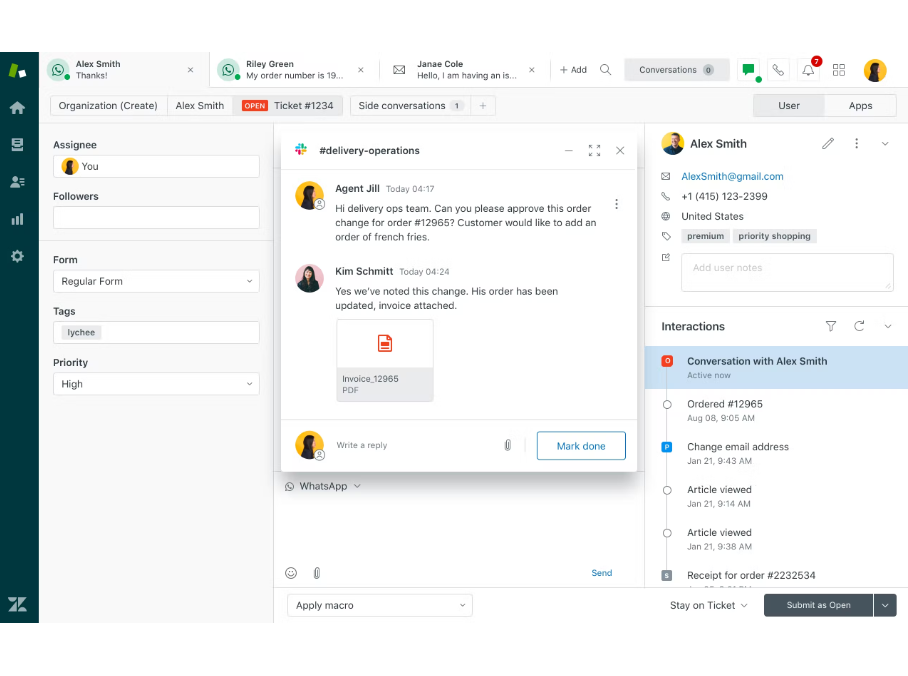
A conversation that only the AI agent handled is an AI agent ticket in Zendesk. Zendesk's help center says that for most users "AI agent tickets are read-only", that triggers and other automated workflows "cannot act on AI agent tickets", and that when the conversation is escalated the ticket "becomes a regular, editable ticket". Admins and agents with permission can edit some fields and can take over the ticket at any point during the AI conversation.
When a conversation is escalated, Zendesk adds the conversation history to the ticket, and voice AI agents post the call transcript and a summary before the hand-off. What the human receives beyond that depends on the data your procedures collect before escalating.
Can Zendesk AI agents read images and attachments?
No. Zendesk's help center states: "AI agents process only text in conversations and tickets. AI doesn't scan attached files and media in conversations." Attachments reach the human agent after escalation. If your customers often send screenshots of an error, those conversations go to a person.
How Zendesk measures and bills AI agents
Zendesk bills AI agents per automated resolution, and an LLM decides what counts. When a conversation ends, "a verification process is performed by an LLM that evaluates the text of the conversation". Conversations that pass are verified resolutions and draw from your allowance; those that don't pass are contained resolutions, and assisted escalations don't count either. A conversation ends 72 hours after the first email on email, 2 hours after the first message on messaging by default, and at hang-up on voice.
Each plan includes 5 or 10 automated resolutions per agent a month, then $1.50 per resolution committed or $2.00 pay-as-you-go. The full price list is in our Zendesk pricing guide. AI agent performance has its own dashboard in the AI agents workspace, next to Zendesk's ticket reporting.
What Zendesk AI agents do well
Zendesk AI agents are strongest where Zendesk's platform is broad. Zendesk has voice AI agents that hand calls to people with a transcript and a summary. It is testing custom agents for procedures on human tickets in an early access program. Procedures and API integrations are now included in every Suite and Support plan, and generated answers can be translated automatically. For teams that run Zendesk across many departments, keeping the AI inside Zendesk is a real advantage.
The TeamSystem experience with Zendesk AI agents and Aura
TeamSystem runs AI agents on both Zendesk and Customerly: Zendesk AI agents on other TeamSystem products and Aura on Fatture in Cloud, Italy's leading invoicing software with 600,000+ customers.
In her experience, the hard part on Zendesk was the structure around the AI rather than a single feature: a separate AI agent for each channel, use cases kept short and separate so they would not overlap, replies maintained for each language, and screenshots from customers that the AI could not read. With Aura, one training covers every channel, the agent answers in any language from one knowledge base, and it reads images and files. When TeamSystem compared the two on the same kind of customer questions, Aura won on accuracy. See the Fatture in Cloud success story.
Questions to ask before you scale Zendesk AI agents
Before you add channels, languages or brands to Zendesk AI agents, check six things on your own account:
- How many AI agents will you maintain once every channel is covered?
- How many replies will you maintain once every language is covered?
- What share of your conversations include a screenshot or a file?
- What share of AI conversations are verified resolutions, contained resolutions and escalations?
- What does the human agent receive when the AI escalates?
- What will the automated resolutions cost at next year's volume?
The full list is in our 15 questions to ask before you scale AI on your helpdesk.
How Customerly Aura handles the same points
Customerly Aura is one AI agent with the inbox built around it. Compared with the points above:
| Zendesk AI agents | Customerly Aura | |
|---|---|---|
| Channels | One AI agent per channel type | One training, the same agent on chat, email, WhatsApp and Facebook |
| Images and files | Text only | Reads images, PDF and TXT files customers share |
| Languages | Activated per agent; replies kept per language; auto-translation of generated answers | Any language from one knowledge base, no extra setup |
| AI-only conversations | Read-only tickets for most agents until escalation | Conversations in the shared inbox; agents take over with "Assign to yourself" |
| Procedures | Procedures and API integrations | AI Missions written in natural language, calling your APIs |
| Billing | Per automated resolution verified by an LLM | Per AI conversation |
Across all Customerly customers, Aura resolves 72% of conversations on average. If you are weighing a change, see Zendesk AI alternatives or Customerly vs Zendesk.
FAQ
Are Zendesk AI agents free?
Zendesk AI agents are included in Suite and Support plans with 5 or 10 automated resolutions per agent a month. Resolutions beyond the allowance cost $1.50 committed or $2.00 pay-as-you-go.
What is the difference between Zendesk AI agents Essential and Advanced?
Zendesk removed the distinction in 2026. Advanced capabilities such as multi-step procedures and API integrations are now included across Suite and Support plans, and Essential and legacy AI agents stop being developed after 31 August 2026.
Can one Zendesk AI agent handle chat and email?
No. In Zendesk's current AI agents experience each AI agent works on one type of channel, so messaging and email need two AI agents.
Can Zendesk AI agents understand screenshots?
No. Zendesk states that its AI agents process only text and don't scan attached files or media.
How many languages do Zendesk AI agents support?
Zendesk's pricing page lists automatic translation of AI agent responses into 80+ languages. Each language is activated per AI agent, and scripted replies are kept per language.
Can a human agent take over a Zendesk AI agent conversation?
Yes, if they have permission. Admins and permitted agents can take over the ticket during the AI conversation; for other agents, AI-only tickets are read-only until escalation.
What is Zendesk Copilot?
Copilot is Zendesk's AI assistant for human agents, sold as an add-on at $50 per agent a month, paid yearly. It is separate from AI agents, which talk to customers.
See Aura on your own help center
The quickest way to compare is on your own questions. Book a demo to see Aura answer them, or read how Aura, the AI customer support agent works.
Automate Smarter with
Customerly Aura
Related articles
Get the latest strategies, tips, and trends in customer service Learn how to deliver exceptional customer service and boost customer loyalty.