New featureMore from November 2026

Two-factor authentication for every Customerly account

Protect your Customerly sign-in with a 6-digit code from an authenticator app, on every plan, on the web and in the mobile app.

In short

  • A 6-digit code from any authenticator app at every new sign-in
  • 10 single-use recovery codes, with a reminder when you run low
  • After 5 wrong codes, sign-in pauses for 15 minutes and you get an email
  • Live for every account on every plan, web and mobile app
Video tutorial: How to Set Up Two-Factor Authentication (2FA) in Customerly

A leaked password shouldn't open your inbox. Every Customerly user can now add a second factor: a 6-digit code from an authenticator app on their phone, asked at every new sign-in.

Turn on two-factor authentication

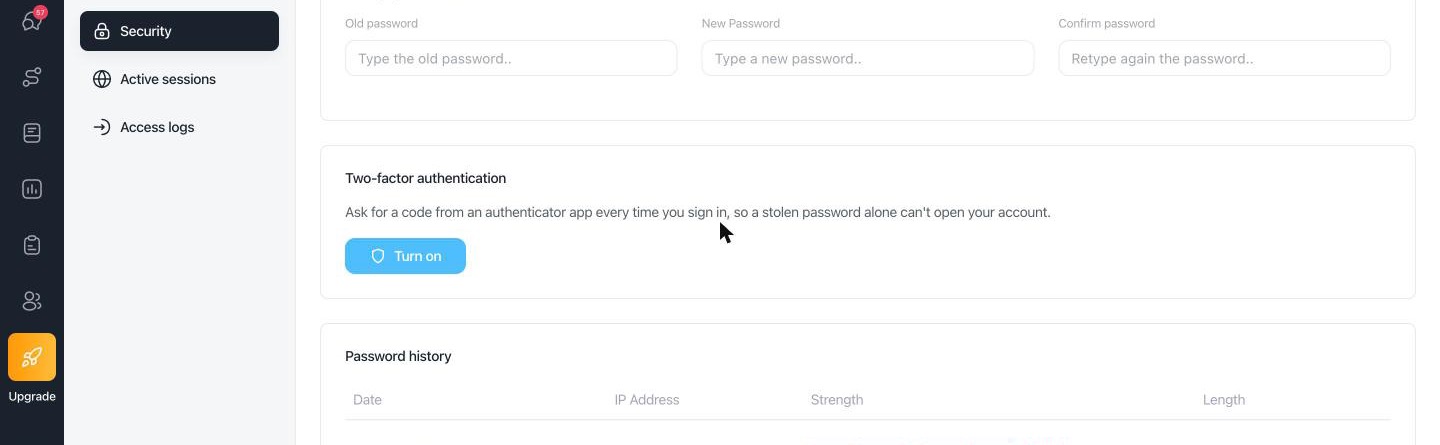
  1. Go to Account Settings → Security and click Turn on in Two-factor authentication.
  2. Scan the QR code with an authenticator app, such as Google Authenticator, 1Password or Authy, and type the 6-digit code it shows.
  3. Save your 10 recovery codes somewhere safe: they get you in if you lose your phone.
  4. Next time you sign in, with your password or with Google, Customerly asks for the code.
  • Released: November 10, 2026

Customerly Account Settings, Security section, with the Two-factor authentication card and its Turn on button

What's included

  • Any authenticator app: on the web and in the mobile app.
  • Recovery codes: 10 single-use codes, with a reminder when you are running low. Regenerate them, or turn 2FA off, at any time with a code.
  • Brute-force protection: after 5 wrong codes, sign-in pauses for 15 minutes and you get an email.
  • Security emails: whenever 2FA is turned on or off, or a recovery code is used.

Availability

Live for every Customerly account, on every plan. Each person turns it on for their own account. The mobile app asks for the code at sign-in from version 2.9.0.

Our advice

Turn it on for every teammate with access to customer data, admins first. Keep the recovery codes in your password manager, not on the same phone as the authenticator app.

One active device, now on mobile too

The one active computer per account rule now covers the mobile app as well (November 18).

The step-by-step guide is in the Help Center: Two-factor authentication (2FA).
Related updates

See the full changelog
Improvement

More from May to November 2026: AI flow builder, WhatsApp, security and fixes

The AI flow builder knows every new flow option, WhatsApp and Facebook connect faster, and security, infrastructure and many fixes shipped from May to November.

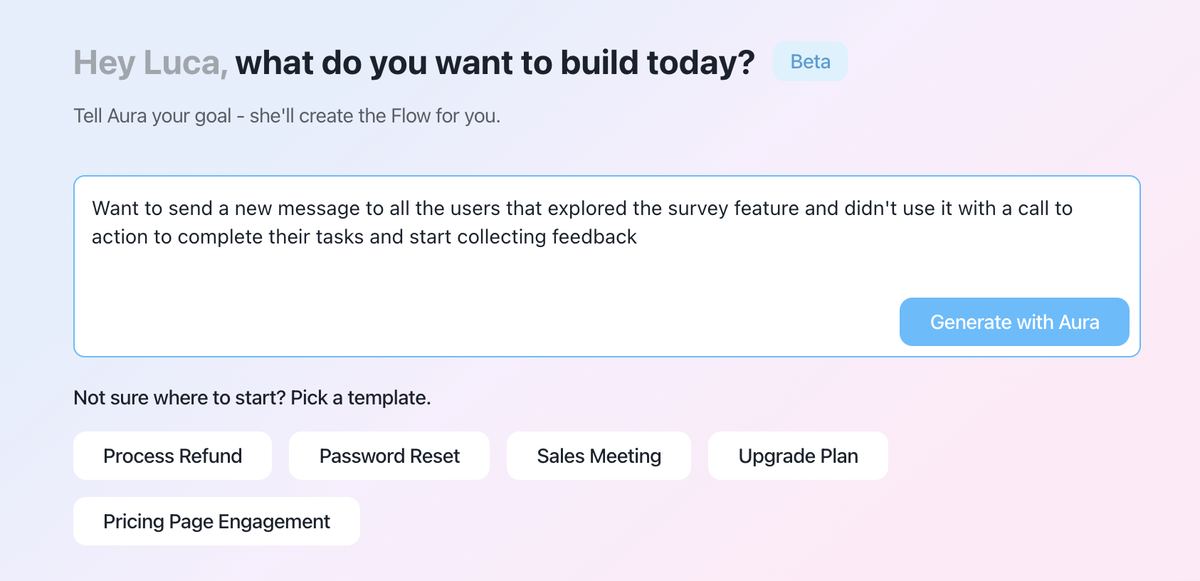
  • Describe a flow and Aura builds it, including schedules and business hours paths
  • The messenger shows customers in real time when a conversation is escalated or closed
  • Faster WhatsApp and Facebook connection right from the connect cards
  • Security hardening, infrastructure upgrades and better SDK monitoring
Flows & automationWhatsApp & channelsLive chat & MessengerPlatform & security
AI flow generator asking what you want to build today, with a goal typed in, a Generate with Aura button and starter templates such as Process Refund and Password Reset
Product recap

October 2026: one active computer per account and more accurate locations

Each Customerly account now works on one computer at a time, contact locations are refreshed weekly, and WhatsApp marketing templates use Meta's dedicated API.

  • One active computer per account, with Resume here to switch
  • More accurate country detection, with location data refreshed weekly
  • WhatsApp marketing templates go through Meta's Marketing Messages API
  • The Messenger installed status counts only your own website or app
Platform & securityContacts & CRMWhatsApp & channelsLive chat & Messenger
New feature

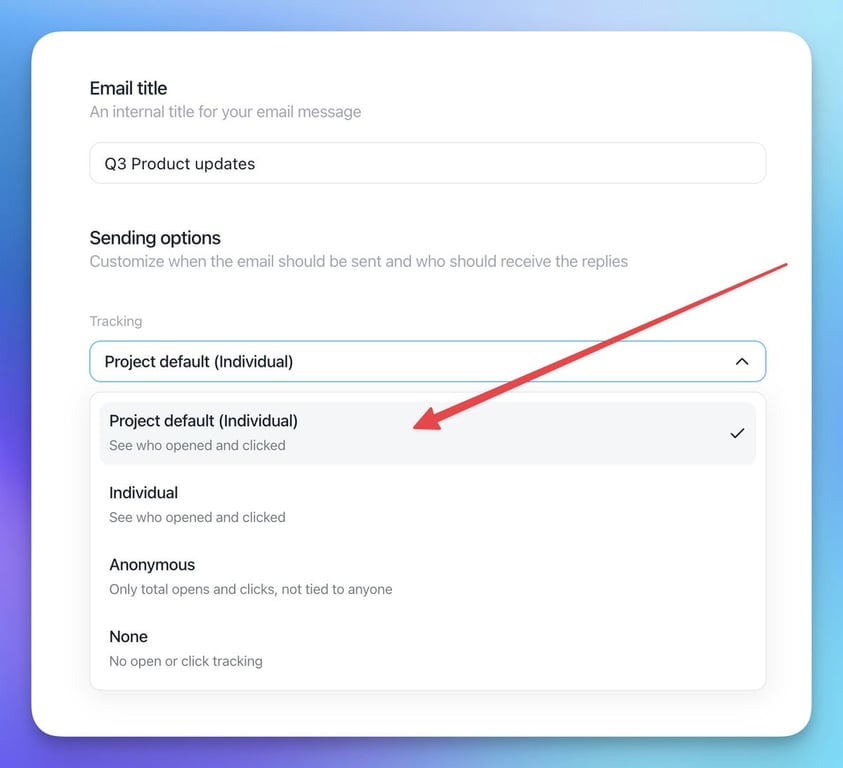
Privacy-friendly email tracking: choose Individual, Anonymous or None

Choose how emails are tracked, per project or per email, let contacts opt out of tracking, and send legally required notices to unsubscribed contacts.

  • Three email tracking modes: Individual, Anonymous and None, per project or per email
  • Anonymous stats keep your open and click rates, and bot opens and clicks are ignored
  • A Manage email preferences page lets contacts opt out of tracking
  • Send mandatory notices, like terms updates, to unsubscribed contacts
  • Tracking links and pixels use an opaque token instead of contact or campaign IDs
Email marketingContacts & CRMPlatform & security
Email sending options with the Tracking dropdown open, listing Project default (Individual), Individual, Anonymous and None

AI Support That Sets You Apart.
Start Leading Today.

AI Support Software