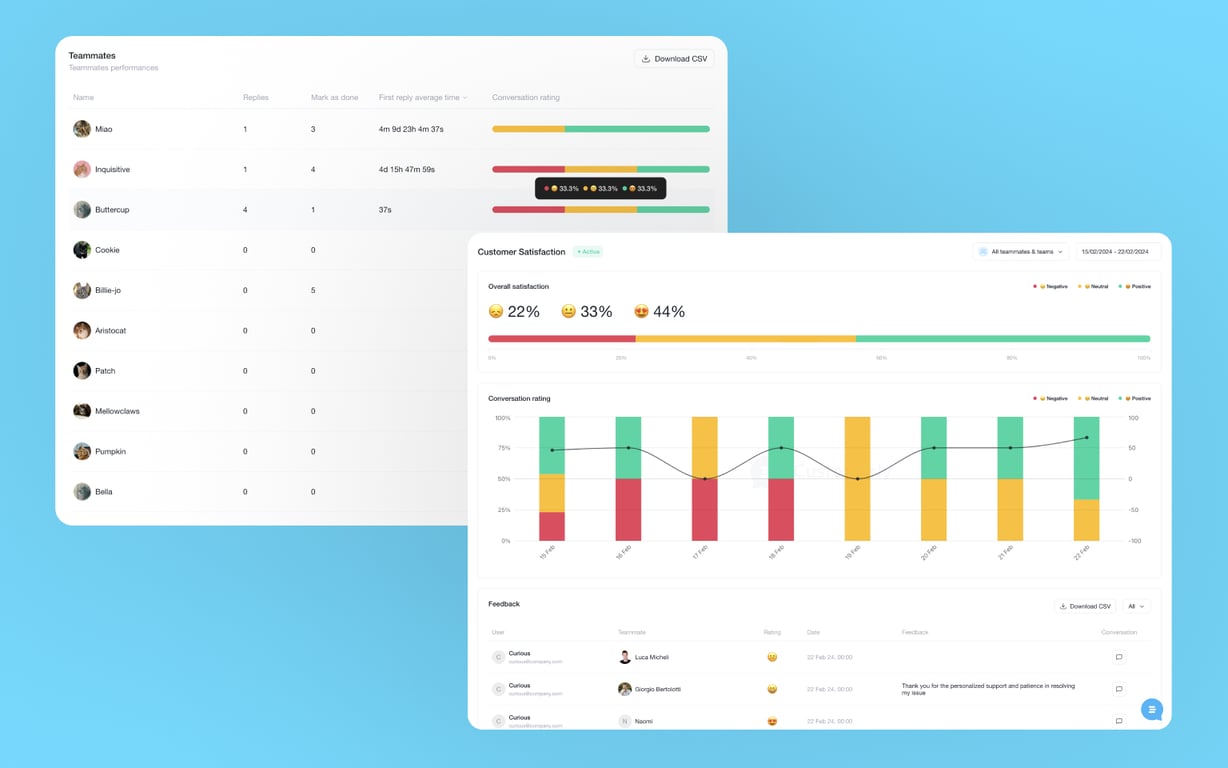
Customerly's Customer Satisfaction (CSAT) feature emails a survey to your customers after a conversation is closed, so you get real-time insight into how they feel about your support. Ratings and open-ended feedback appear in Insights → Customer Satisfaction.
Turn on CSAT surveys
Go to Project Settings → Feedback → Customer Satisfaction and toggle the feature on. A CSAT survey is then delivered after each closed conversation, so you collect immediate feedback from your customers.
- Where to find it: Project Settings → Feedback → Customer Satisfaction
Set up email delivery and timing
CSAT surveys are sent by email, so delivery depends on the setting Messenger → General Settings → Continue your conversation via email. Check that it is configured so surveys reach your customers.
- Delay threshold: choose how long to wait before sending. With a 5-minute threshold, the survey is emailed 5 minutes after your team closes the conversation.
- Why the delay helps: customers get a short moment to reflect on the interaction before they give feedback.
Read ratings and feedback in Insights
Besides rating their satisfaction, customers are prompted to leave open-ended feedback. The Customer Satisfaction report gives you an overview of your customers' feedback and satisfaction scores.
- Where to find it: Insights → Customer Satisfaction