


New featureMore from January 2025

New Customerly mobile apps with AI Summarize, AI Reply and translation

This update announced new Customerly mobile apps with a cleaner UI and web app capabilities such as AI Summarize, AI Reply, inline translation, tags and mentions.

In short

  • A new, cleaner UI and a list view with accessible, editable profile details
  • AI Summarize and AI Reply in mobile conversations
  • Search Help Center articles and include them in replies
  • Inline translation, filtering by tag, adding tags and mentions
  • Send conversation transcripts from the app

This update announced the new Customerly mobile apps, built to deliver an improved experience and to bring capabilities already available in the web app to your phone.

What the new mobile apps include

  • Cleaner UI: a new and cleaner interface.
  • List view: profile details are accessible and editable.
  • AI Summarize: get an AI summary of a conversation.
  • Send Transcript: send a conversation transcript.
  • AI Reply: reply with AI.
  • Help Center articles: search articles and include them in your replies.
  • Inline Translation: translate messages inline.
  • Tags: filter conversations by tag and add tags to conversations.
  • Mentions: mentions come to the mobile apps too.
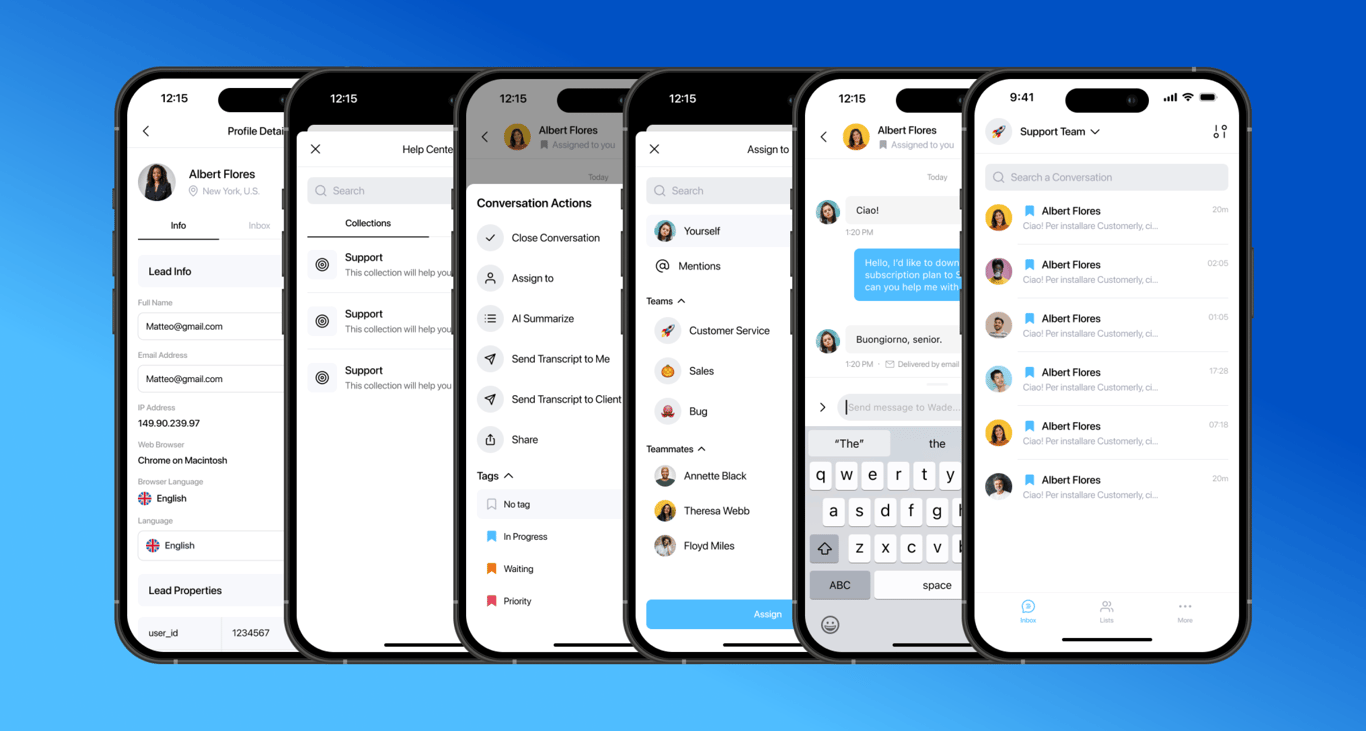
Six screens of the new Customerly mobile app: profile details, Help Center collections, conversation actions with AI Summarize and Send Transcript, the Assign to menu, a chat, and the conversation list

Related updates

See the full changelog
Product recap

October–November 2025: Missions v2, Public API v2 and new mobile SDKs

Assistant and Missions v2 run on ChatGPT 5.1, Public API v2 adds conversation, message and inbox endpoints, and new iOS, Android and React Native SDKs arrive.

  • Assistant v2 and knowledge-base-aware Missions v2, running on ChatGPT 5.1
  • Public API v2 endpoints: GET /Conversations, GET /Messages and GET /Inboxes
  • New iOS, Android and React Native SDKs replace the legacy mobile libraries
  • Send WhatsApp templates from your inboxes and let Aura support WhatsApp customers
  • Smoother onboarding, cleaner pasting and one-click access to conversations from Activity
Aura AI agentAPI & developersMobileWhatsApp & channelsInbox
New feature

Teammate Away Mode: see who is available before assigning conversations

Teammates can mark themselves as Away, and green or orange status dots in the inbox sidebar and Assign menu show who can take a conversation right now.

  • Turn on Away Mode from your profile picture at the bottom left of Customerly
  • A green dot means available, an orange dot means Away Mode is on
  • Status dots appear next to each teammate in the inbox left sidebar
  • The Assign menu shows each teammate's availability before you assign a conversation
Inbox
New feature

Inbox AI features upgraded to the GPT-4o and GPT-4o mini models

The AI capabilities inside Customerly's inboxes now run on the latest GPT-4o and GPT-4o mini models, for better AI training and better responses for your team.

  • AI capabilities in the inboxes now use the latest GPT-4o and GPT-4o mini models
  • The upgrade improves AI training and responses inside the inboxes
Inbox

AI Support That Sets You Apart.
Start Leading Today.

AI Support Software

