You can now connect your Customerly workspace to Claude over MCP and let it work with your contacts, conversations, Help Center and insights from the chat. You decide what Claude may touch before it touches anything.
Add Customerly to Claude
- Endpoint:
https://mcp.customerly.io/mcp - In Claude: Settings → Connectors → Add → Add custom connector, then Connect. Customerly handles the sign-in, so no OAuth client ID or secret is needed.
- Pick the workspace: if you belong to several Customerly projects, choose the one Claude works with.
- Before you start: you need Administrator access to the workspace and a Claude plan that supports custom connectors.
- Released: July 2026, with the connection page on July 23
Choose what Claude can do
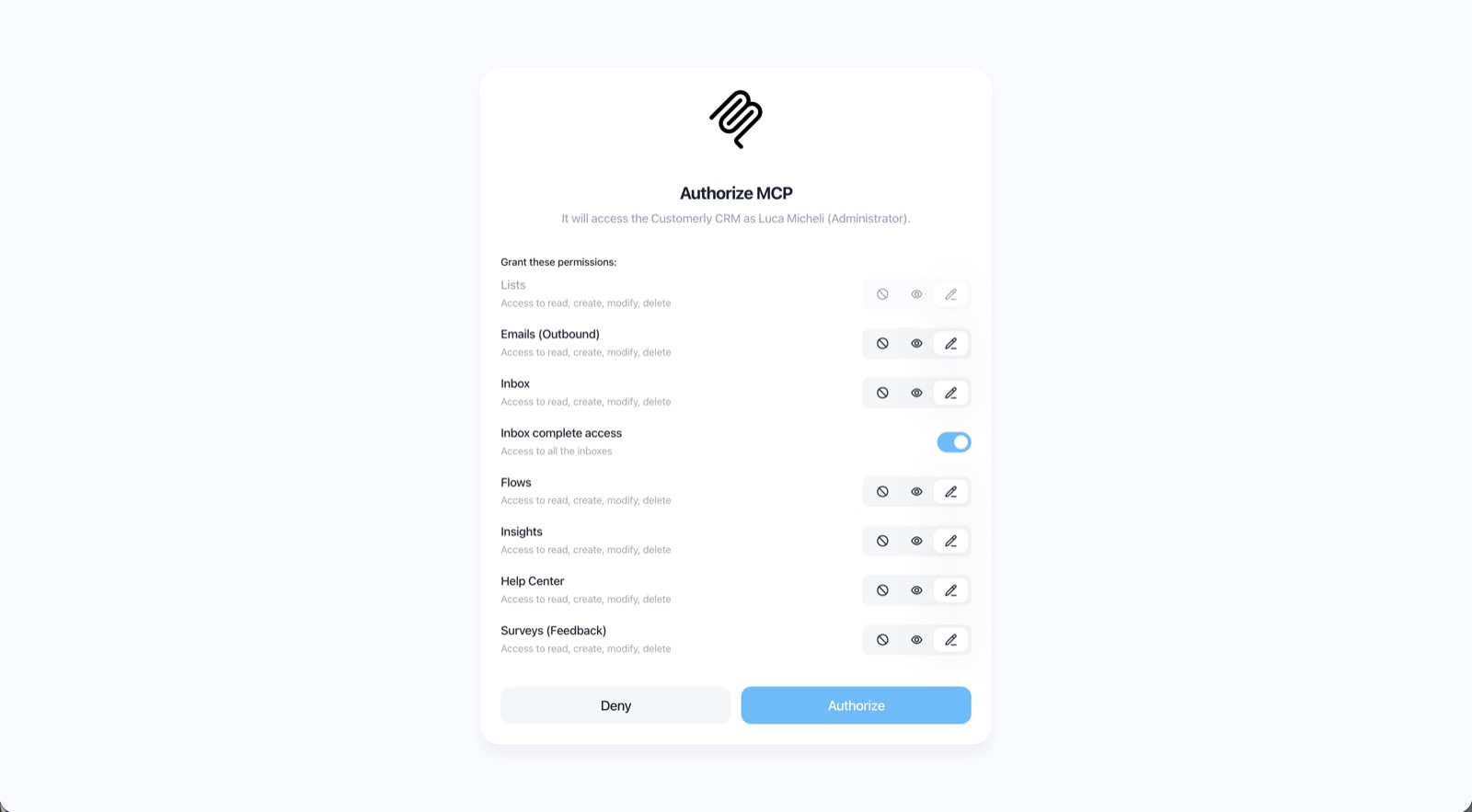
On the Customerly authorization screen you set a level for each resource: No access, Read only or Full access.
- Resources: lists, emails, inbox (with an option for all inboxes), flows, insights, Help Center and surveys.
- Runs as you: Claude can never do anything your own Customerly user can't do.
- Our advice: start with read only everywhere, then give full access only where you want Claude to make changes, typically the Help Center and the inbox.
API tokens with expiry and permissions
Public API access tokens can now have an expiration date and their own permissions, so each integration gets only the access it needs.
- Released: July 21–22, 2026
The step-by-step guide is in the Help Center: How to connect Customerly to Claude with MCP.