Product recapMore from July 2026

July 2026: merge duplicate contacts and filter by how often events happen

Merge duplicate contacts into one history, segment contacts by how many times they did something and when, and a richer contact activity timeline.

In short

  • Merge duplicate contacts into one record with one complete history
  • Filter contacts by how many times an event happened, inside a time window
  • Contact activity timeline with infinite scroll and new activity types
  • Browser back and forward buttons now work in the inbox

In July you can merge duplicate contacts, build segments from how often people do something, and follow a contact's activity further back. A few Help Center and inbox fixes shipped too.

Merge duplicate contacts

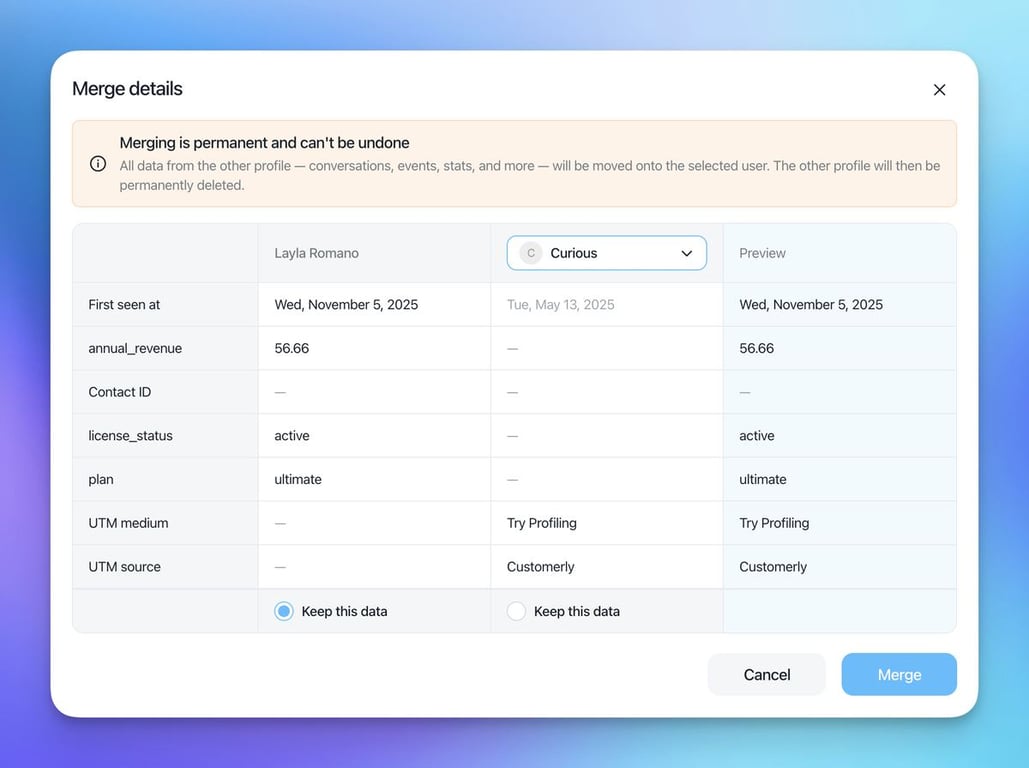
Merge duplicates into one record with one complete history. The app explains what happens to the data before you confirm, and "First seen at" shows which record is older.

Merge details dialog comparing two contact profiles field by field, with First seen at dates, Keep this data options, a preview column and a warning that merging is permanent

Filter contacts by how often an event happened

Segment contacts not only by whether they did something, but by how many times and inside which period. For example: everyone who clicked a button more than 5 times in the last 30 days.

  • Where to find it: Contacts → + Add filter, then an event condition with a count (for example total > 5) and + Time Window.
  • Always up to date: the time window is rolling, so contacts enter and leave the list as their behavior changes.
  • Use it everywhere: save it as a list for email campaigns, in-app messages and surveys, or export it as a CSV.
  • Released: July 22, 2026
  • Guide: Filter contacts by how many times an event happened

Contacts filter row reading where did event inbox click new message button total greater than 0 in the last 30 days, with Save list and Create with AI buttons

Also in July

  • Contact activity timeline: loads older activity as you scroll and shows new types of activity (July 23).
  • Inbox navigation: the browser's back and forward buttons now move between conversations (July 31).
  • Help Center social links: handled better in the Help Center settings (July 7).
  • Help Center images: header and footer images now save correctly (July 30).
Related updates

See the full changelog
Product recap

September–October 2025: WhatsApp templates, company profiles and more

WhatsApp templates now send from the Inbox with delivery tracking and bulk retry, and a new Company Profile page shows company properties and their users in one place.

  • Send approved WhatsApp templates from the Inbox, synced automatically from Meta
  • Start a conversation from a WhatsApp number, even if the contact isn't set up yet
  • Resend all failed WhatsApp messages in one click and see why each one failed
  • Company Profile page with company properties and associated users
  • Show original email to inspect headers and raw content
WhatsApp & channelsInboxContacts & CRMHelp Center
New feature

Privacy-friendly email tracking: choose Individual, Anonymous or None

Choose how emails are tracked, per project or per email, let contacts opt out of tracking, and send legally required notices to unsubscribed contacts.

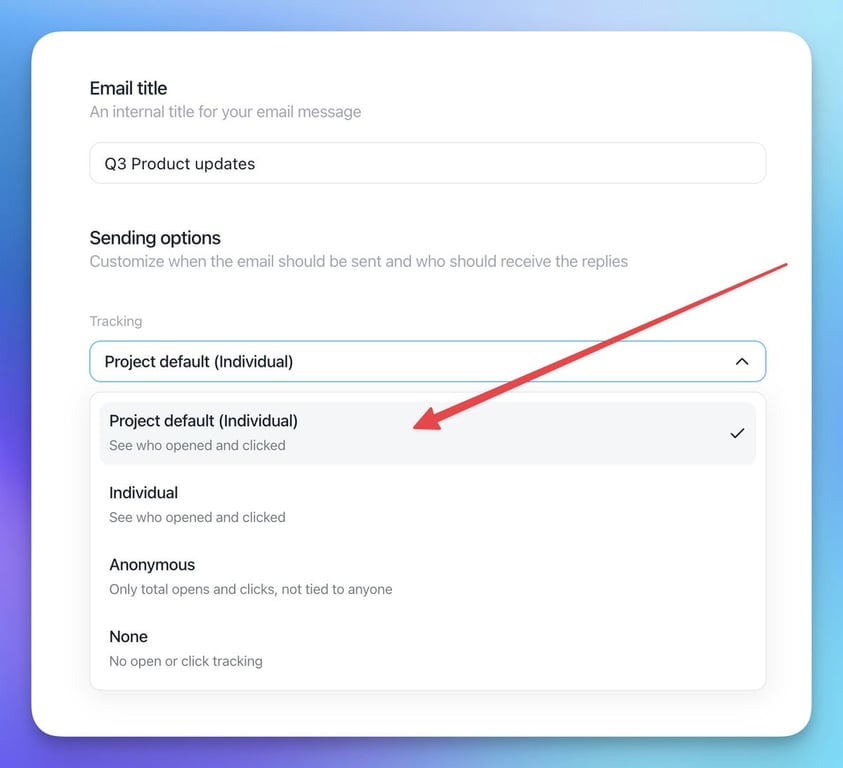
  • Three email tracking modes: Individual, Anonymous and None, per project or per email
  • Anonymous stats keep your open and click rates, and bot opens and clicks are ignored
  • A Manage email preferences page lets contacts opt out of tracking
  • Send mandatory notices, like terms updates, to unsubscribed contacts
  • Tracking links and pixels use an opaque token instead of contact or campaign IDs
Email marketingContacts & CRMPlatform & security
Email sending options with the Tracking dropdown open, listing Project default (Individual), Individual, Anonymous and None
New feature

AI Assistant, AI Missions and Chatflows: automate support with Aura

Aura, the AI Assistant, answers and escalates questions, AI Missions automate tasks like refunds, and new AI tools help teammates reply, summarize and write articles.

  • AI Assistant: Aura understands complex queries, replies in any language and escalates
  • AI Missions automate tasks like refund requests and store conversation properties
  • Chatflows offer customers choices, assign conversations or close chats
  • AI Reply, Write for Me, AI Summarize and Create Articles with AI for teammates
Aura AI agentFlows & automationInboxHelp Center

AI Support That Sets You Apart.
Start Leading Today.

AI Support Software