

Customer Service Automation: Meaning, Examples, and Benefits


Customer service automation is the use of software to answer, route and resolve customer requests without a person doing each step by hand. In 2026 it has two layers: an AI agent that answers customers directly from your help center, and the automations around the conversation (routing, assignment, proactive messages, surveys, self-service) that make the remaining human work faster. At Customerly, the AI agent is Aura: it resolves 72% of conversations across all Customerly customers and hands the rest to your team in one inbox. This guide defines customer service automation, lists the benefits and the ways it fails, and shows six automations you can set up in Customerly this week.
Last updated: 28 October 2026
What is customer service automation?
Customer service automation is any process that resolves or advances a customer request without a human doing it manually. The customer still gets an answer; the difference is who, or what, produces it.
The automations a support team uses in 2026, from the most to the least impact:
- AI agent: answers the customer from your help center and documents, takes actions through your API, and escalates to a person when it cannot resolve the request.
- Self-service knowledge base: a help center where customers find the answer before they ask.
- Ticket routing and assignment: conversations reach the right team or agent without manual triage.
- Proactive chat messages: answers that appear on the page where the question usually arises.
- Profiling questions: the chat collects what the agent needs before a person reads it.
- Automated feedback: CSAT and NPS surveys after the conversation, and the follow-up they trigger.
Older "automated customer service" meant an FAQ bot with buttons. The step change is the AI agent: it understands the question instead of matching keywords, which is why AI customer service resolves a share of volume that scripted bots never did.
Key benefits for growing support teams
Customer service automation lowers the cost per resolved conversation and shortens the time to the first useful answer, while the team works on the conversations that need judgement. The eight benefits below are what a growing support team should expect.
1. Reduce customer support costs
Support costs grow with volume faster than you can hire. Automation breaks that link: the AI agent resolves the repetitive questions at a price per conversation, and the help center resolves the rest of tier-1 at no marginal cost.

A self-service help center also helps the team: agents find the current answer to "how do I" questions in the same place customers do. Customerly bills per seat plus per AI conversation; see the pricing page for the current numbers and the outsourcing guide for how automation compares with hiring or outsourcing.
2. Improve your customer success metrics
Faster, correct answers improve every satisfaction metric. Customers who solve their problem in one touch rate the experience higher, and many prefer to find the answer themselves before they write to support.
Consistent self-service and instant AI answers lift customer satisfaction metrics such as CSAT and NPS, which are tied to retention. Customer service automation software should also run the surveys that measure it, such as the one below.
3. Increase your customer service team productivity
The problem with manual support is repetition: the same ten questions, all day. Automation takes those ten questions off the queue, so the team's time goes to complex requests.
Commonly asked questions belong in help center articles and canned responses, and the AI agent should answer them before a person sees them. In Customerly, the AI Companion also helps the agent on the conversations that remain: Write a reply for me, Expand a response, Summarise this conversation, and Create a Help Center article from the conversation just closed, so the next customer with the same question is answered by the AI.
4. Support all day long, seven days a week
If you sell worldwide from one time zone, automation is how customers get answers while your team sleeps. The AI agent answers 24/7 in any language; the help center is always open; chat triggers answer the predictable question on the page where it arises.
Anything the automation cannot resolve waits in the inbox with the full history, and the agent takes over in the morning without asking the customer to repeat anything.
5. Share and centralize information
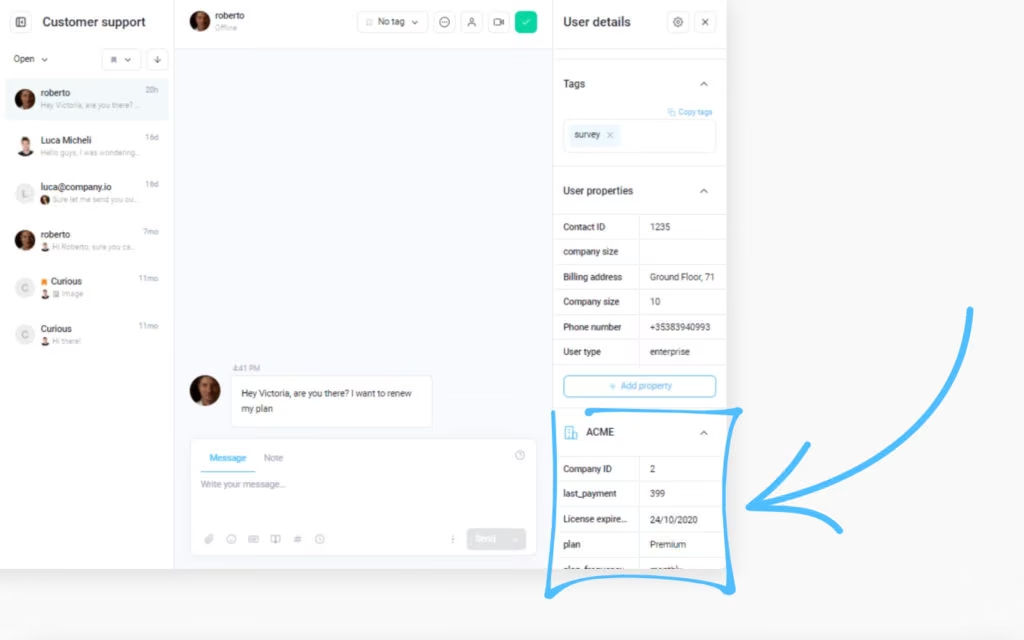
Centralising conversations and customer data in one place is itself an automation: nobody copies context between tools. Customerly's inbox receives live chat, email, WhatsApp and Facebook, with the customer's profile, plan, last pages viewed and previous conversations next to every message.
Canned responses with shortcuts (#refund, #businesshours) keep answers consistent across the team, and the same canned responses train Aura.
6. Marketing and SEO benefits
Good support is marketing: customers who get answers recommend the product. A public help center also ranks in search for the questions your customers type, which brings people to your site before they are customers. Wix's help docs were one of its key drivers of organic traffic in its early days.
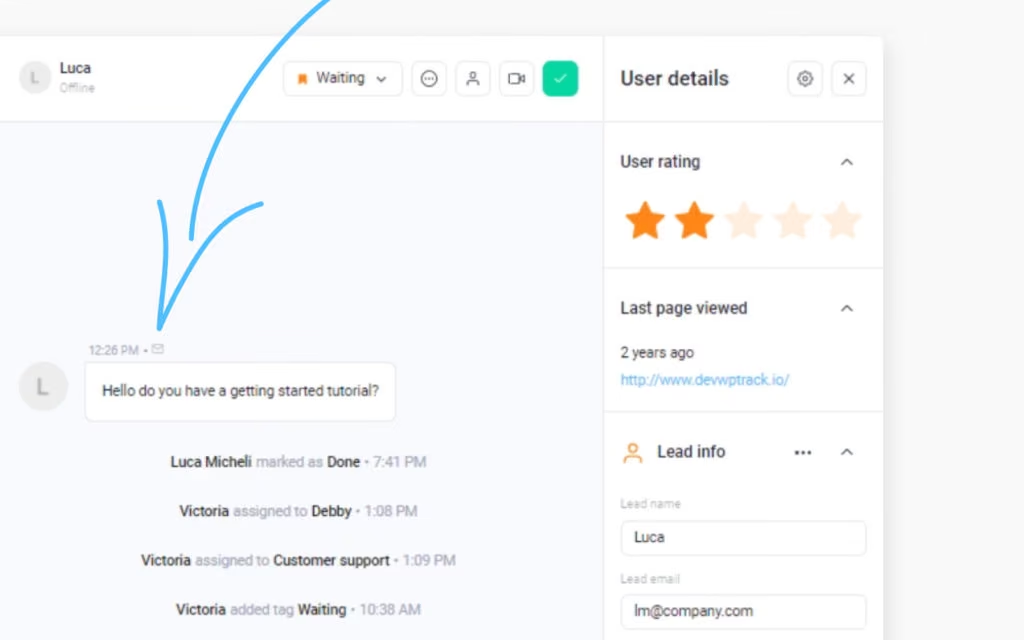
Proactive chat messages on the pages where users need help most also lift engagement with tutorials and videos, like the one below.
7. Automate positive reviews
Automation can turn satisfied customers into public reviews. Run an NPS or CSAT survey after the conversation, and use a flow to invite only the promoters to G2, Capterra or Trustpilot.
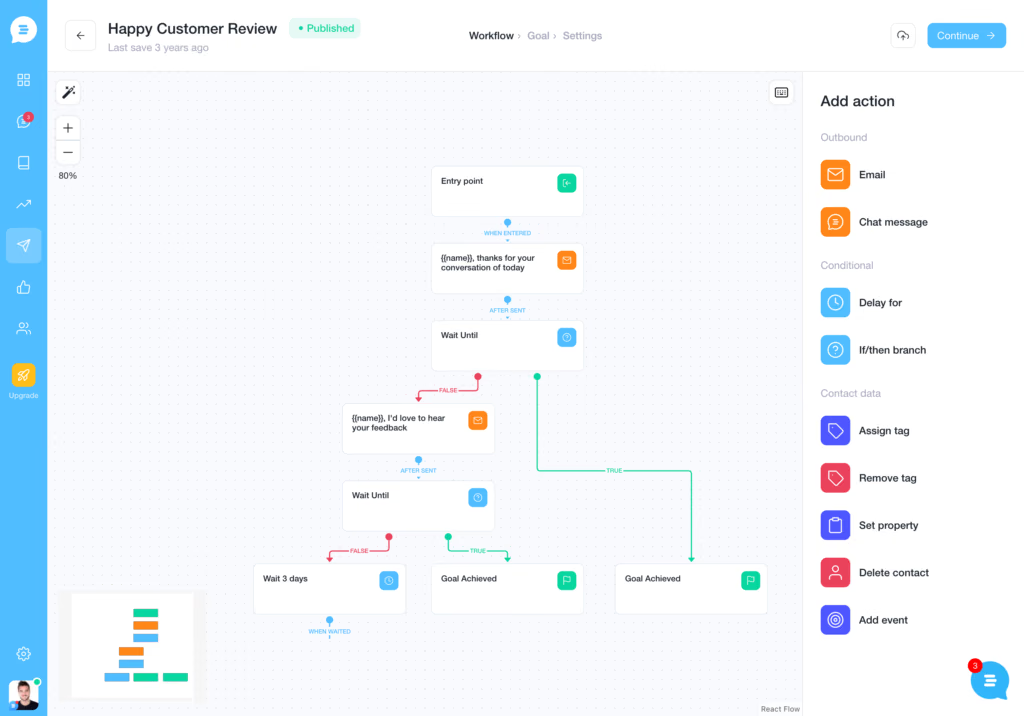
In Customerly, this is a Flow: survey response → segment → email or chat message with the review link. See how to get more reviews on G2.
8. Reduce customer complaints
The least visible benefit: fewer complaints. Customers who find the answer in seconds, on the page where they had the question, do not write an angry message an hour later. Measure it with the volume of conversations tagged as complaints before and after you automate.
What could go wrong? Common challenges of automation
Customer service automation fails when it is set up to deflect customers instead of to answer them. The three failures to design against:

- The AI answers from thin documentation. An AI agent is only as good as the help center it reads. Outdated or missing articles produce confident, wrong answers. Fix the articles first, then turn the AI on.
- No way to reach a person. Gartner research found that most customers try self-service, but only a small share resolve the issue there. The automation must hand off to a person in one step, with the history, when it cannot resolve the request.
- Poor information structure. If customers cannot find the help center, they do not use it. Put it in the chat widget, in the product and in the footer, and watch the failed-search report to see what is missing.
Signs you need to automate your support
You need customer service automation when the team repeats itself, the queue grows faster than the team, and customers complain about waiting. Three questions to ask:
- Are the same ten questions most of your volume?
- Does first response time go up every month?
- Do customers write "still waiting" follow-ups?

If the answer is yes, the next step is not another hire but an AI agent on the repetitive volume, with the automations below around it. Here is how to set them up in Customerly.
🤖 AI + Human Support = Perfect Balance
Enhance your customer service with Aura AI, automating inquiries while keeping human interaction for complex needs.6 customer service automation examples (and how to set them up)
The six automations below are the ones that move the numbers for a support team, with the steps to set each one up in Customerly. Start with the first two: they remove the most volume.
1. Let an AI agent answer first
An AI agent resolves the conversation before a person reads it, and it is the automation with the largest effect on volume. Across all Customerly customers, Aura resolves 72% of conversations.
What Aura does:
- Answers from your Help Center articles, canned responses and uploaded documents, in the customer's language.
- Reads screenshots, PDF and TXT files that customers share.
- Runs AI Missions: multistep actions through your API, such as checking an order or updating a plan.
- Works on live chat, email, WhatsApp and Facebook from one training.
- Hands off to a person in the same inbox when it cannot resolve the request. The agent sees "Aura is taking care of this conversation" and clicks Assign to Yourself to take over at any moment.
How to set up Aura
- In Knowledge, make sure your Help Center articles are current and that Use the article for AI training is on for the ones Aura may use. Upload internal documents and transcripts under Documents if the answers live there.
- In Settings › AI, set the formality (casual, neutral, formal), the tones of voice, whether Aura includes images and videos from articles, and whether it links the source article in its answers.
- Turn Aura on for the channels you want, test it with your own most common questions, and read the first week of conversations in the Aura inbox and in Aura Insights (resolution rate, handoffs, topics).
Every handoff is a signal: either the article is missing, or the request needs a person. Fix the first kind weekly. The AI helpdesk checklist lists what to test before you scale; how to automate customer service with AI goes deeper on the setup.
2. Create a self-service knowledge base
A knowledge base lets customers answer their own question before they write to you, and it is the source your AI agent answers from. Both jobs use the same articles.
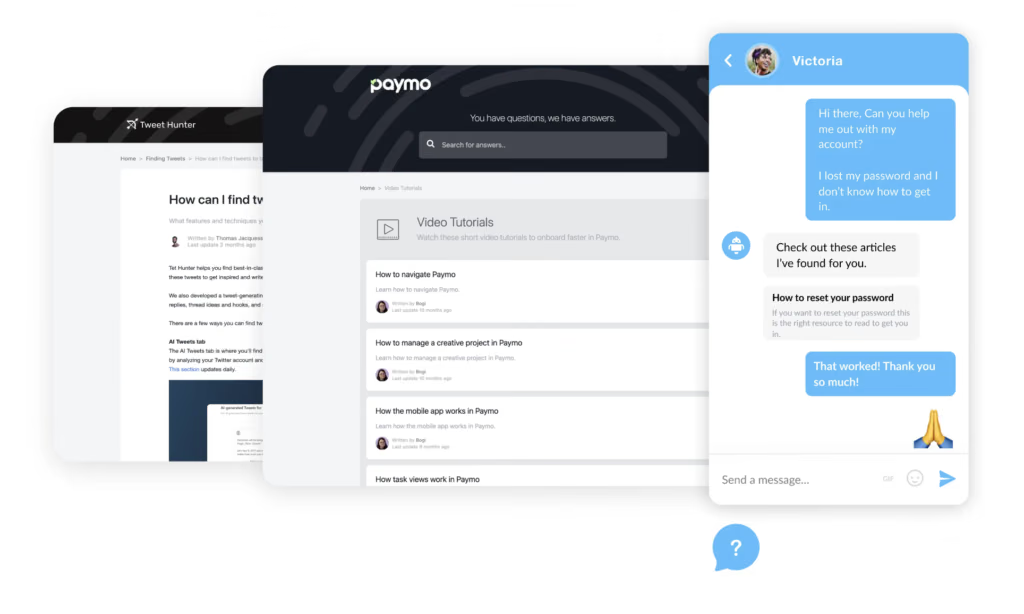
Paymo, for example, organises its help center into collections: getting started, video tutorials, subscriptions and pricing, and so on.
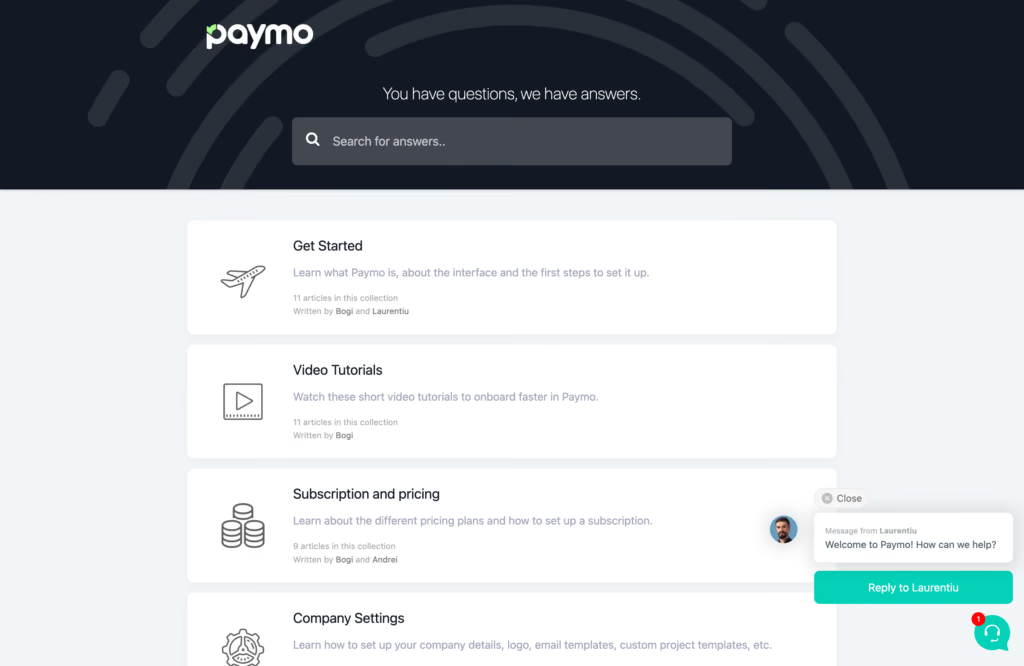
The Customerly Help Center publishes those articles on your own domain, in several languages, and inside the chat widget, so customers find them where the question arises.
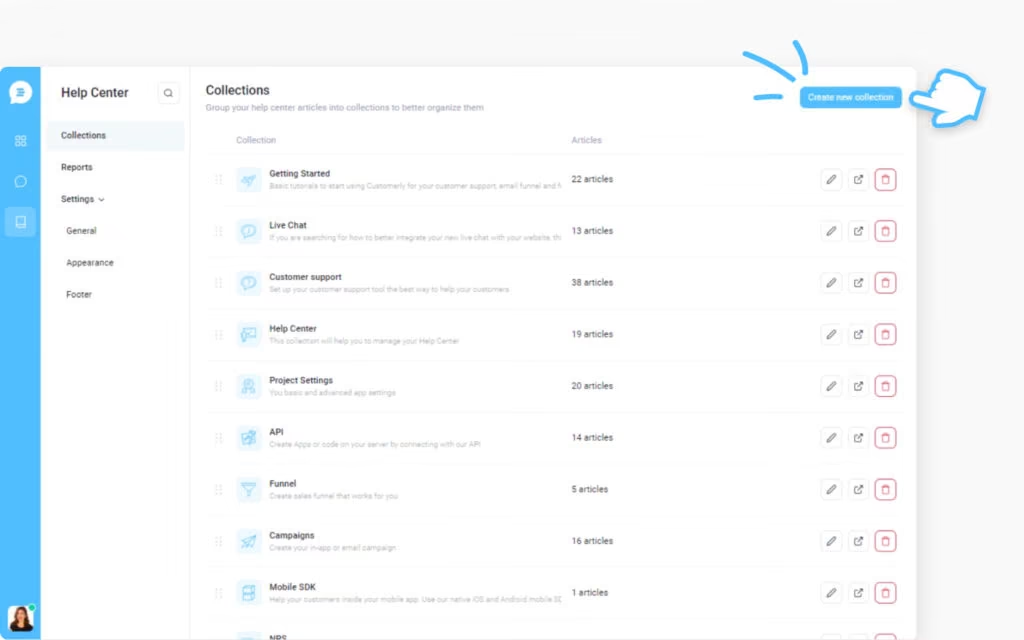
How to create a self-service portal
In Customerly, head to Knowledge › Help Center and click Create New Collection.
Open the collection and add articles with the Create new article button.
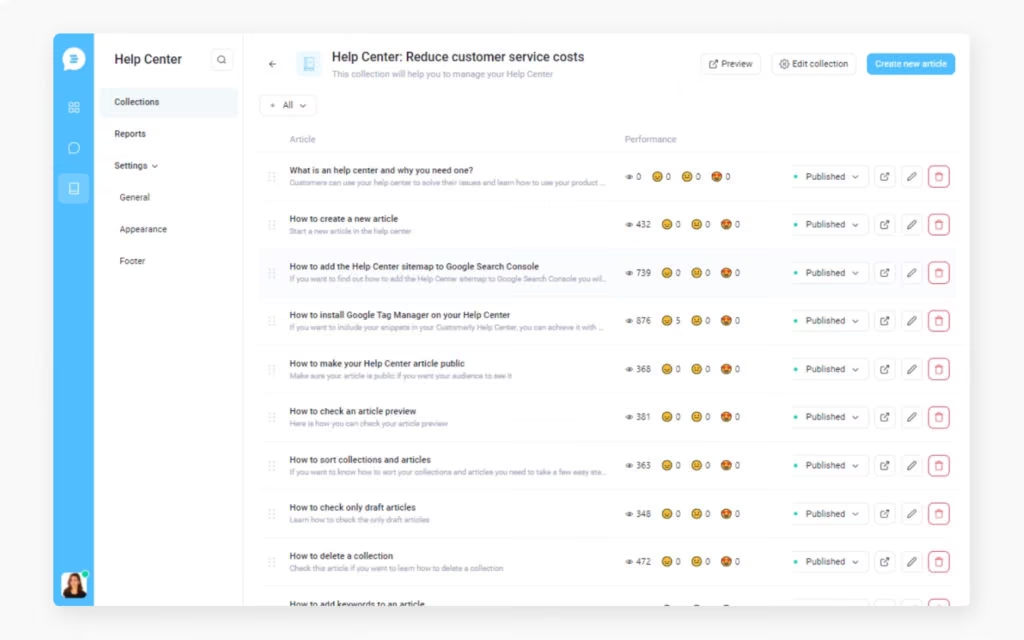
Each article has a status (Draft or Published), an author, an audience (who can see it), keywords for search and SEO, related articles, a Highlight on Messenger option, the Use the article for AI training toggle and a Stats tab. Several teammates can write; the collection shows who created each article and its status.
Add keywords to improve search
Add the words customers actually type (including the wrong ones) as keywords on each article, so the help center search and the chat widget find it.
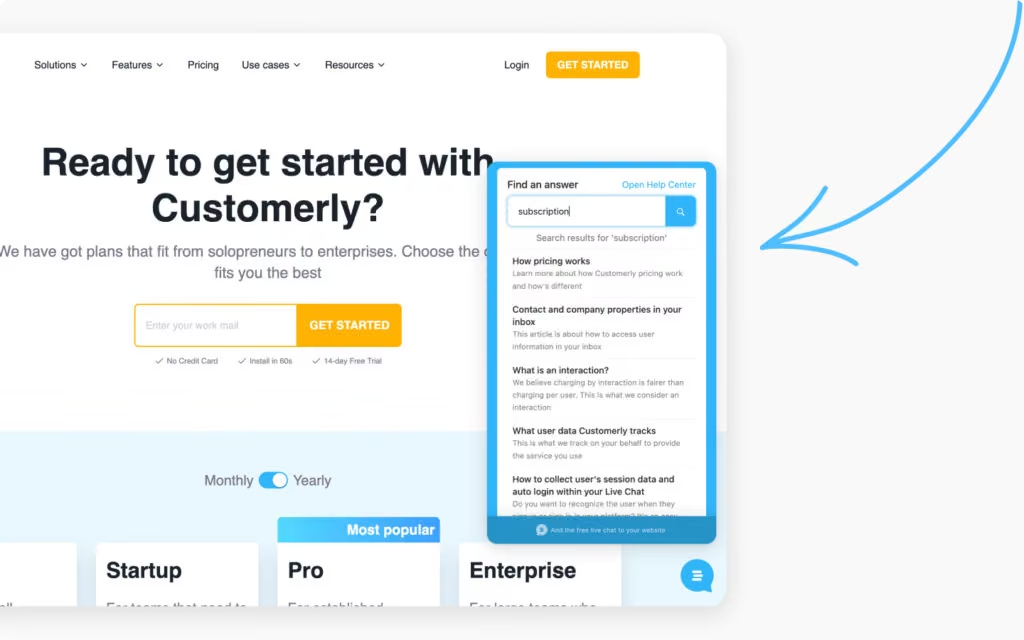
Put the help center in the chat
Customers can search the help center from the Customerly live chat without leaving the page. Searching "NPS" in the messenger lists the matching articles, and if the customer still writes, Aura answers from the same articles.
Add in-page links
Link the help center from your website footer, your product's help menu and your support page. Easy to find is the whole point of a self-service portal. More on structure and writing: how to create a knowledge base and knowledge base software compared.
3. Answer questions instantly with live chat
Live chat is the channel where automation shows most: customers expect an immediate response in chat, and with an AI agent plus help center search in the widget, they get one.
In Customerly, set up the live chat in a few steps:
- Choose your installation: a code snippet, the WordPress plugin, or the iOS and Android SDKs.
- Customise the appearance, business hours, the automated questions asked before a conversation, and the default team for new conversations.
- Launch. Customers search the help center, get answers from Aura, and reach your team when they need a person.
When a person takes over, the whole team works from one inbox with the customer's details (email, location, plan, user properties), internal notes and @mentions, so a conversation can move between teammates without the customer noticing.
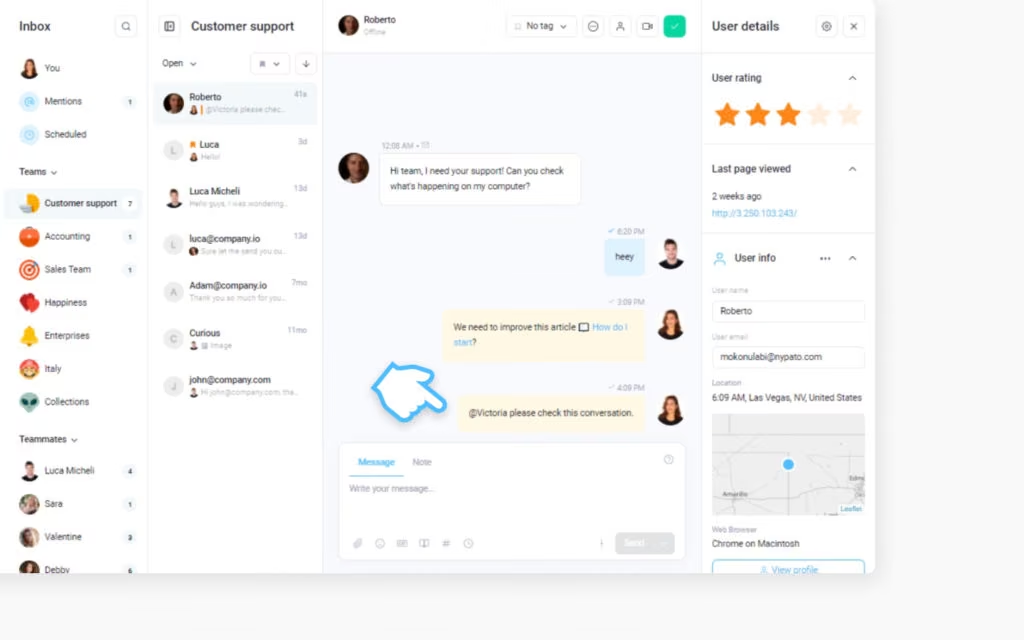
The full list of what to look for is in live chat features and the best live chat software comparison.
4. Proactive chats to reduce customer concerns
A proactive chat message answers the question before the customer asks it, on the page where it always comes up. If a question arises every time a customer lands on the billing page, put the answer there.
How to set up a proactive chat message
- Pick a chat trigger, for example an in-app tutorial message like the ones in 7 live chat triggers, or write your own.
- Choose the page or the user behaviour that triggers it.
- Put the key point and a link to the help center article in the message.
That is it. The message serves the answer when the customer needs it, and if they reply, Aura or your team continues the conversation. More ideas in 7 live chat triggers.
5. Automate assignment and routing
Automatic assignment gets the conversation to the right team without a person triaging the queue. Ticket routing uses what the customer wrote, the customer's data (plan, company, language) or the channel to assign the conversation to a team or an agent.
In Customerly, teams (for example Support, Tech, Billing, Sales) have their own inboxes, and automation rules assign new conversations by topic or customer attributes. Flows can also tag the conversation and trigger an API call, for instance to create a record in another system.
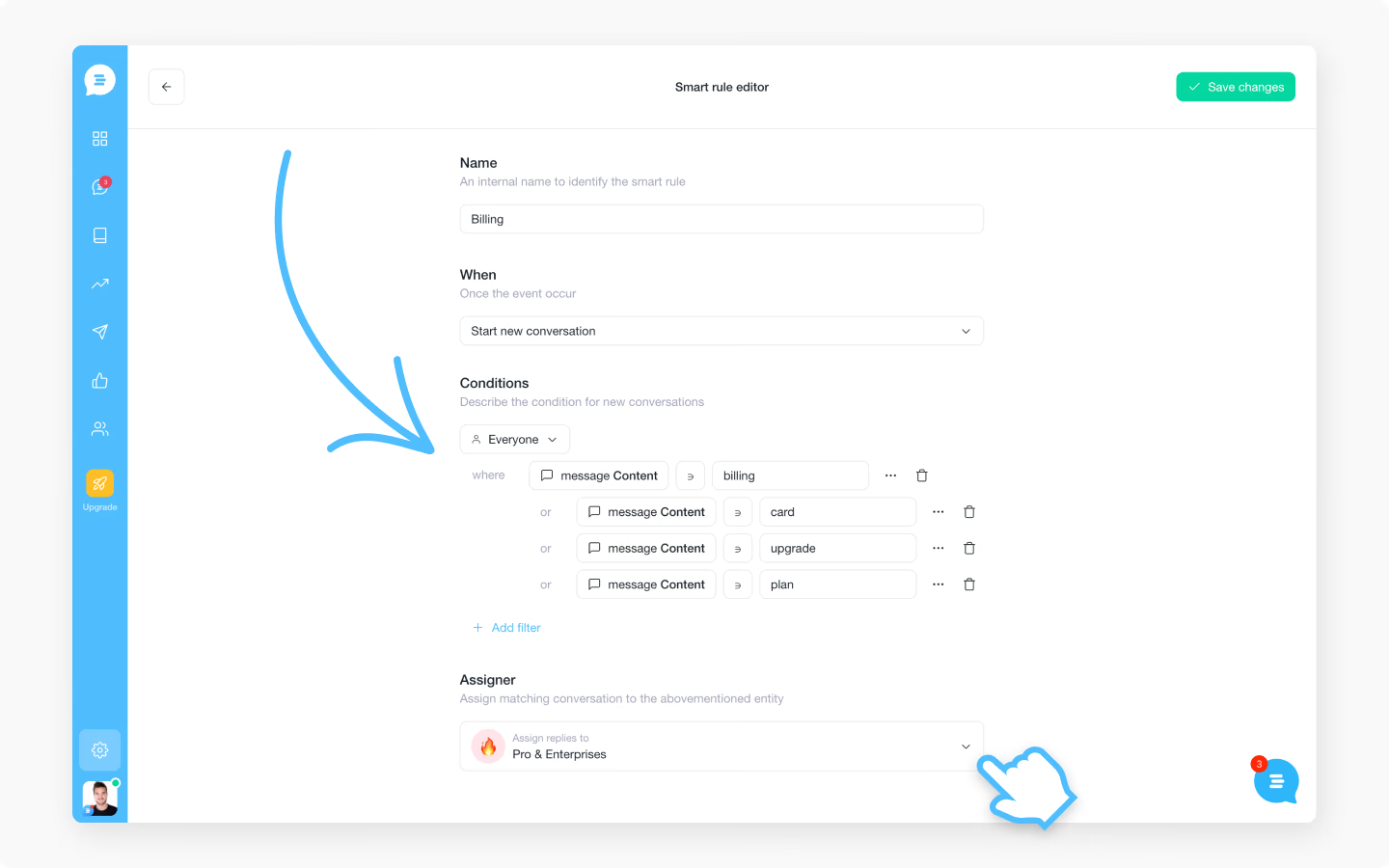
The result is a faster first human reply, because the right person sees the conversation first.
6. Use automated profiling questions to save time
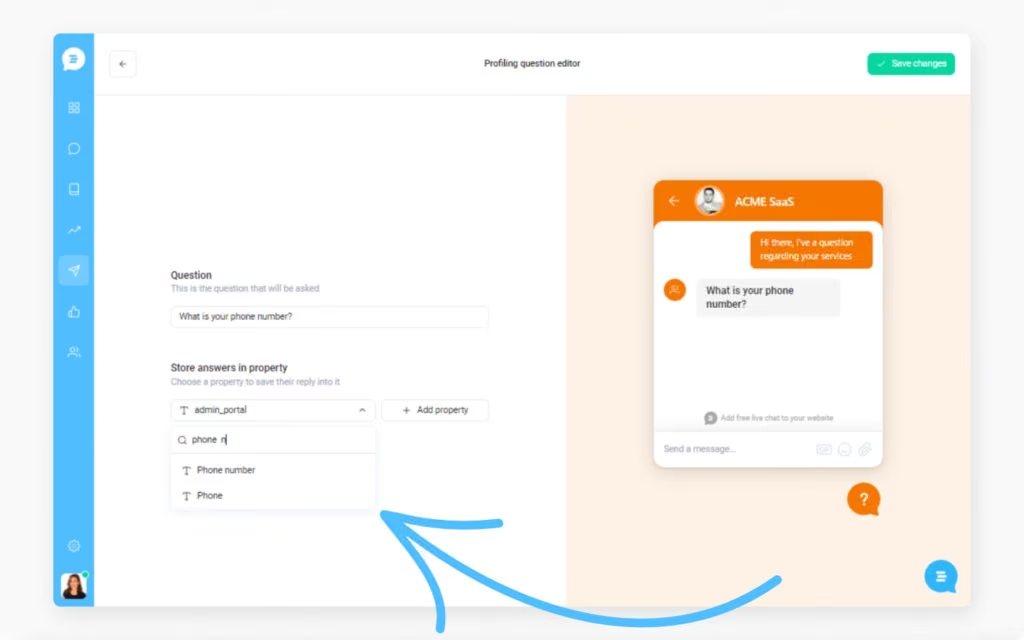
Profiling questions collect what the agent needs before a person reads the conversation: the account email, the plan, the product area, a phone number if you call back.
In the Customerly messenger, set the questions the chat asks before a conversation starts. The answers land in the customer's profile and in the conversation, so the agent (or Aura) starts with context instead of asking for it.
How to continuously improve your automations
Customer service automation is maintained, not installed: the help center is a living part of your product, and the AI agent is only as current as the articles it reads. Two feedback loops keep it honest.
Use an integrated customer feedback system
Every help center article in Customerly collects a rating from the reader. Articles with poor feedback are the ones to rewrite first.
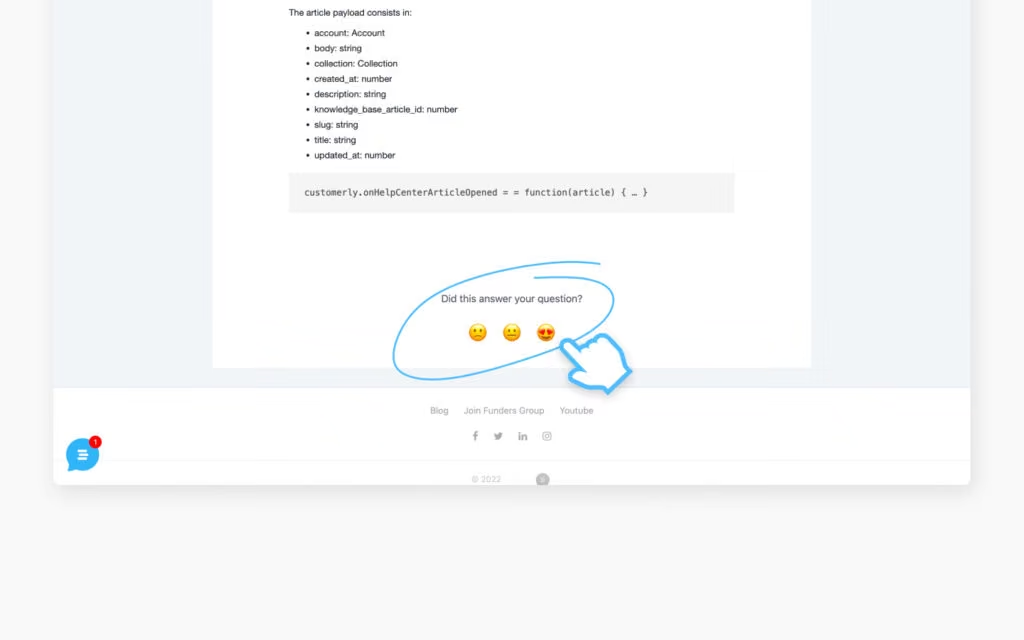
Run CSAT surveys after conversations, whoever answered them, and compare the scores of AI-resolved and human-resolved conversations. If the AI scores lower on a topic, the article behind it needs work.
Use analytics to find what is missing
The most useful report a support team has is the list of searches that returned nothing. In Customerly, open Knowledge › Help Center, then Reports next to Collections.
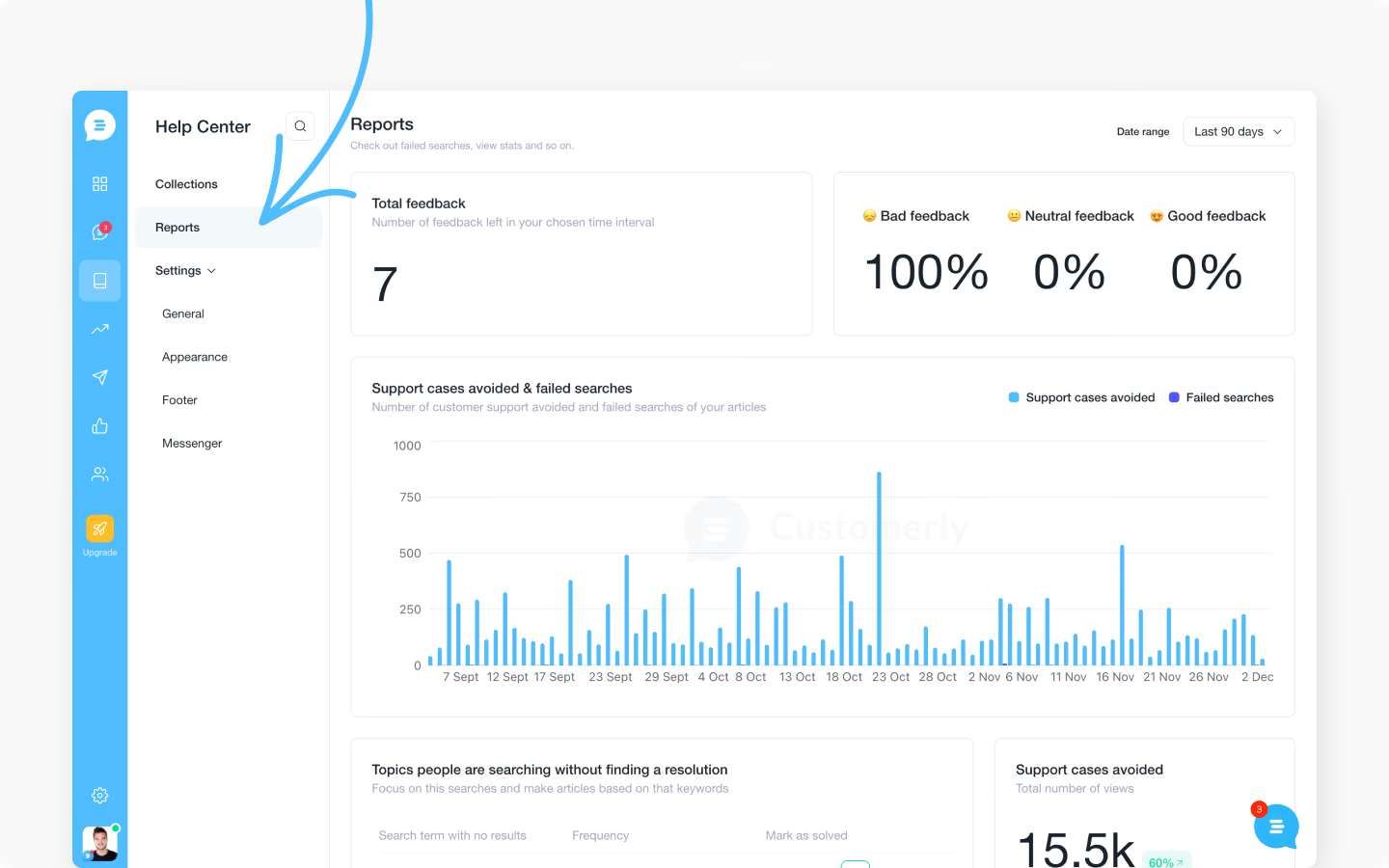
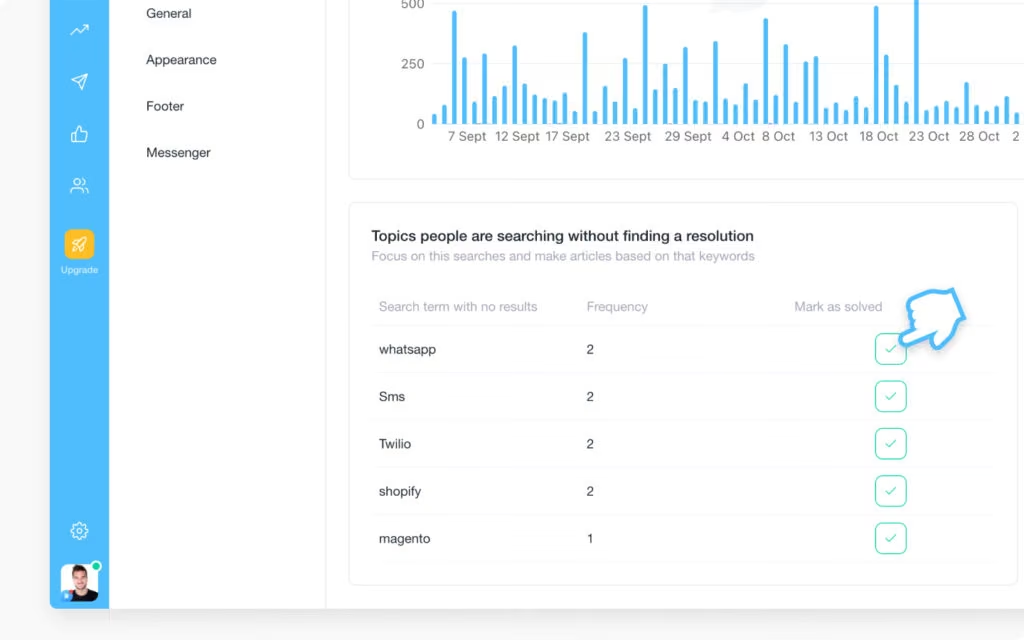
The Failed Searches report lists every search that returned no article and how often it was made.
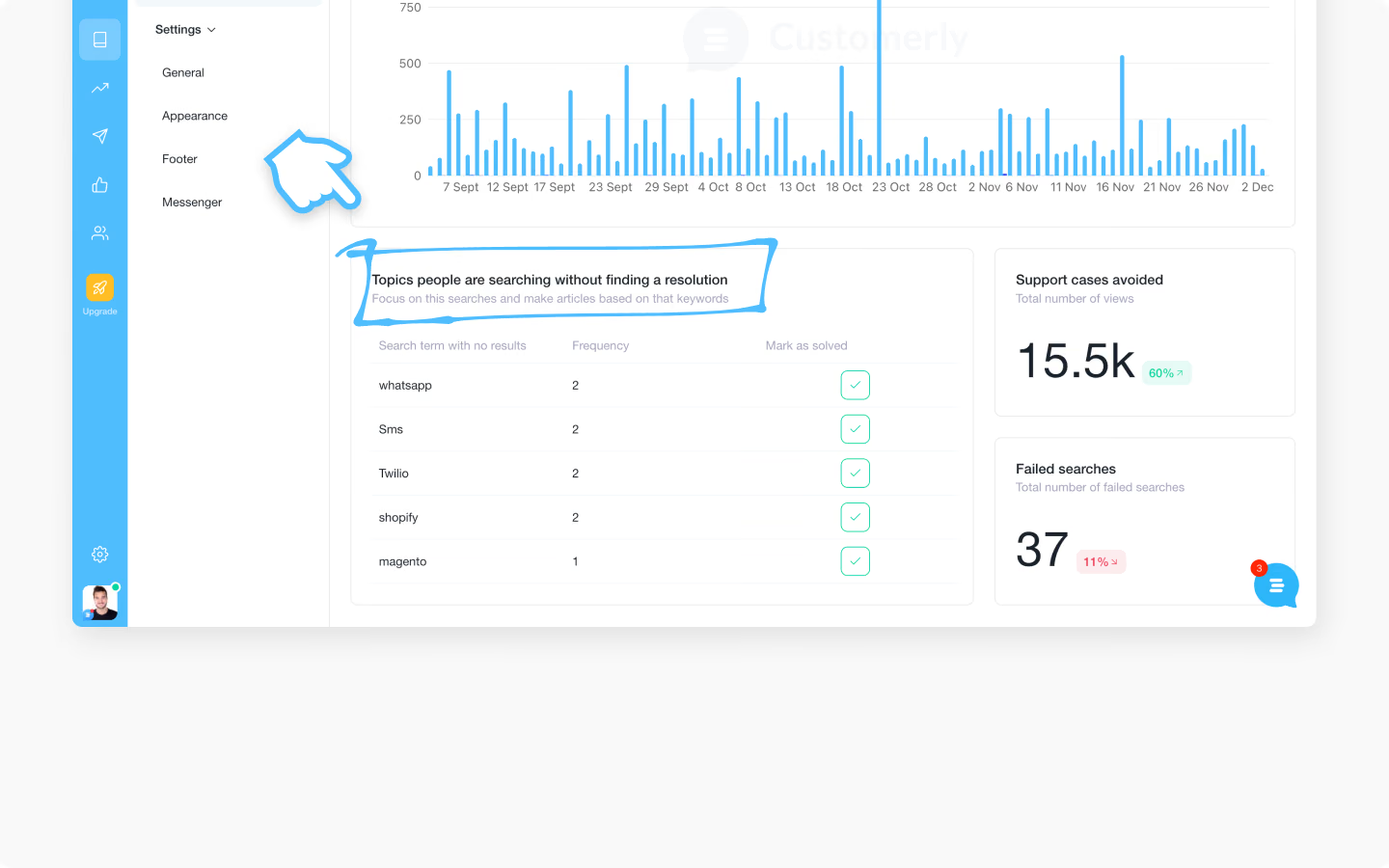
A new feature without documentation shows up here first. Write the article, mark the search as solved, and the AI agent answers that question from the next conversation on.
Aura Insights add the second loop: resolution rate, handoffs and topics per period. A topic with many handoffs is either missing an article or needs a person by design. Decide which, weekly.
Final tip
Automate customer service with your team, not instead of it. The AI agent and the help center take the repetitive volume; your people take the conversations that need judgement, and they own the automation: reading handoffs, fixing articles, watching the resolution rate.
Customer experience is the objective. A customer who gets a correct answer in seconds does not care whether a person or Aura wrote it; a customer who is stuck in a bot loop cares a lot. Design the handoff first, then scale the automation.
Start automating customer service by signing up today for a 14-day free trial, or book a demo and we will run Aura on your real conversations. If you are comparing platforms, see Customerly vs Zendesk and the Zendesk alternatives built for AI-first support.
🚀 Automate Smartly, Keep Customers Happy
Customerly helps you automate support efficiently, reducing workload while enhancing customer experience.What is customer service automation?
Customer service automation is software that answers, routes and resolves customer requests without a person doing each step by hand.
In 2026 it means an AI agent that answers from your help center, plus the automations around the conversation: self-service knowledge base, routing and assignment, proactive messages, profiling questions and automated surveys.
What are examples of customer service automation?
An AI agent answering from the help center, a self-service knowledge base, automatic ticket routing, proactive chat messages, pre-chat profiling questions and automated CSAT or NPS surveys.
The first two remove the most volume; the others make the remaining human work faster.
What are the benefits of automating customer service?
Lower cost per resolved conversation, answers in seconds 24/7 in any language, and a team that works on complex conversations instead of repeating itself.
Across all Customerly customers, Aura resolves 72% of conversations; the help center and routing handle much of the rest of tier-1 without a person.
Will customer service automation frustrate my customers?
Only if it deflects instead of answering, or hides the way to a person.
Keep the help center current, let the AI answer from it, and make the handoff to a human one step with the full history. Measure CSAT on AI-resolved and human-resolved conversations separately.
How do I start automating customer service?
Fix your help center first, then turn on an AI agent that answers from it, then add routing, proactive messages and surveys.
In Customerly, that is Knowledge › Help Center, Settings › AI for Aura, teams and automation rules for routing, and Flows for proactive messages and surveys. Start a 14-day free trial or book a demo to run it on your own conversations.
Automate Smarter with
Customerly Aura
Related articles
Get the latest strategies, tips, and trends in customer service Learn how to deliver exceptional customer service and boost customer loyalty.