

AI for Customer Service: Benefits, Use Cases & Top Software

AI customer service is software that answers customers on its own, from your help center and your data, and hands the conversation to a person when it cannot resolve it. In 2026 the useful unit is the AI agent, not the FAQ chatbot: it reads the question, finds the answer in your documentation, takes actions such as checking an order or resetting a password, and escalates with the full history. At Customerly, the AI agent is Aura: it resolves 72% of conversations across all Customerly customers, in any language, on chat, email, WhatsApp and Facebook from one training. This guide explains how AI for customer service works, where it helps, where it fails, and which software to evaluate.
Last updated: 28 October 2026 · Vendor prices checked on each vendor's own pricing page on 28 October 2026
Proof: TeamSystem Fatture in Cloud, Italy's leading invoicing software with more than 600,000 customers, handles around 60% of its support requests with Aura (read the customer story). See Aura: how the AI agent works, or book a demo on your own tickets.
What is AI customer service
AI customer service is the use of AI software to answer, route and resolve customer requests, so that a human team only handles what the AI cannot. It covers four jobs: answering customers directly (an AI agent), helping agents write and summarise (an AI copilot), automating workflows such as routing and tagging, and reporting.
Older "AI customer support" meant a scripted chatbot that matched keywords to canned answers. Today's systems use large language models (LLMs) on top of your own knowledge base, so they understand the question, answer in the customer's language and know when to stop and hand off.
The main goal is to free the support team from tier-1 volume (password resets, "where is my invoice", "how do I connect X") while keeping quality on the tickets that need a person. Done well, AI in customer service lowers the cost per resolved conversation and cuts first-response time to seconds, without the customer repeating themselves to a human afterwards.
How to use AI in customer service
AI for customer service is not one tool. The examples below are the ones that move the numbers for a support team, in rough order of impact.
AI agent (autonomous resolution)
An AI agent answers the customer directly and closes the conversation when the answer is complete. It is the biggest lever because every resolved conversation never reaches a human. AI customer service software typically pairs that agent with a shared inbox, so conversations the AI cannot resolve are handed to a person.
What a 2026 AI agent does that a chatbot did not:
- Answers from documentation, not from a script. Aura AI is trained on your Help Center articles, canned responses and uploaded documents. Update one article and the AI answers better everywhere.
- Takes actions. With AI Missions, Aura calls your APIs during the conversation: check a subscription, update a shipping address, create a record.
- Reads what the customer sends. Aura is multimodal: it understands screenshots, PDF and TXT files that customers share.
- Works on every channel from one training. The same Aura agent handles live chat, email, WhatsApp and Facebook. One knowledge base, every channel, any language, no per-channel setup.
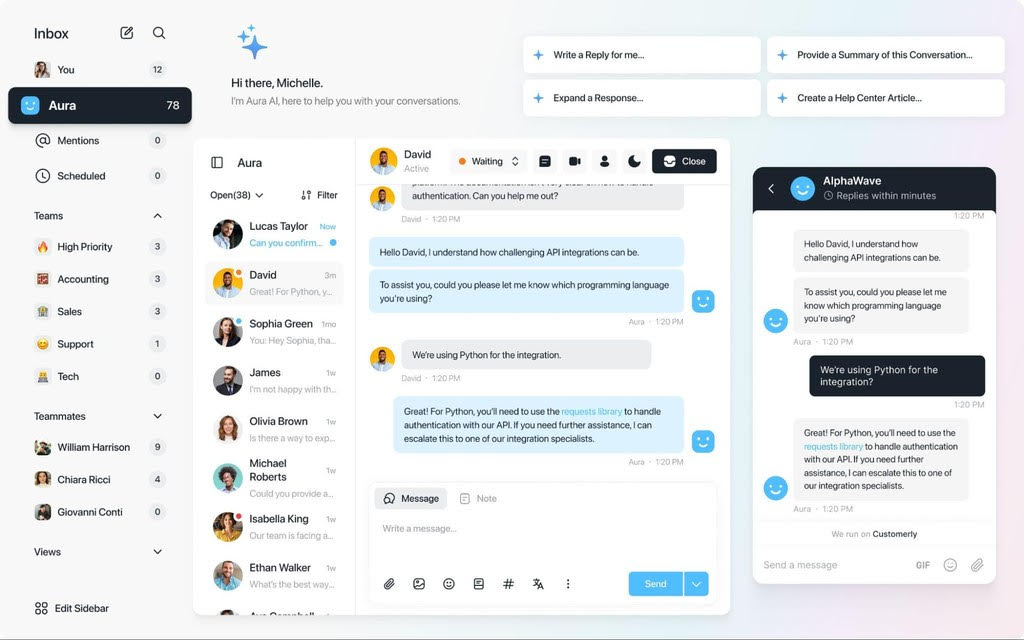
- Hands off cleanly. When Aura cannot resolve a conversation, it escalates to a human in the same Customerly Inbox with the full history. An agent can click "Assign to Yourself" at any moment and take over.
Across all Customerly customers, Aura resolves 72% of conversations autonomously. TeamSystem, which serves more than 600,000 customers with Customerly, runs at 60% AI resolution in production.
Meet Aura – Your AI Customer Service Teammate
Harness Aura’s advanced AI to deliver instant responses, escalate issues, and build stronger customer relationshipsConversational AI
Conversational AI is the layer that lets customers write naturally and get a natural answer back. Advances in natural language understanding and LLMs mean a customer can ask a multi-part question ("I changed my card but the invoice still failed, what now?") and get one coherent answer instead of three FAQ links.
For a support team, conversational AI shows up in three places: the AI agent on the website and in the app, multilingual replies without a translation step, and the live chat experience that no longer forces the customer through a menu tree. The difference between a chatbot and conversational AI is explained in chatbot vs conversational AI.
Automated workflows
Automated workflows handle the repetitive work around a conversation: routing, tagging, prioritising, assigning. AI makes them smarter because the routing decision can be based on what the customer wrote, not only on which form they filled in.
In Customerly, Flows is the no-code builder for these automations: assign conversations to a team based on topic, tag by intent, trigger an API call, or start an onboarding sequence. Automated workflows reduce human error and remove manual triage, which shortens the time to the first useful reply. More examples in automated customer service.
AI writing assistants and agent copilots
Even when a person answers, AI makes the reply faster and more consistent. An AI copilot drafts the response, expands a short note into a full answer, or summarises a long thread for the colleague who takes over.
In the Customerly Inbox, the AI Companion does exactly this from the right-hand panel: Write a reply for me, Expand a response, Provide a summary of this conversation and Create a Help Center article from the conversation you just closed. That last one matters: every answer a human writes can become documentation the AI agent uses next time.
For any text, AI writing assistants can also restructure or shorten a reply, change the tone or technical level, and translate it into another language.
AI sentiment analysis
Sentiment analysis reads the customer's tone and urgency so the team sees the frustrated customer first. AI models are now good enough at reading emotion and intent to flag a conversation that is going wrong before the customer asks for a manager.
Typical uses: raise the priority of an angry conversation, suggest a softer tone to the agent, and cluster feedback across thousands of conversations to show which product area generates the most complaints. In Customerly, AI-powered Conversation Topics group incoming conversations by theme so the team sees what customers are asking about this week.
AI knowledge base
An AI knowledge base is a help center that the AI reads, searches and keeps honest. Its job is to help customers find the right answer quickly, and to give the AI agent the source it answers from.
Two things make a help center "AI-ready": every article can be marked for AI training (in Customerly, a per-article Use the article for AI training toggle), and the system tells you what is missing. Customerly's Help Center reports show failed searches, so the team writes the article customers looked for and could not find. See how this works in Customerly's help center software. Which software to use: knowledge base software compared.
Conversational reporting
Reporting is where AI saves the manager's time. Instead of building dashboards, the manager asks a question and gets the number, the chart, or the summary.
AI-powered reporting also surfaces what a static report hides: which topics the AI resolves and which it escalates, where handoffs happen, and which help center articles are read before a conversation starts. Customerly's Aura Insights show resolution rate, handoffs and topics per period, so you can see where to add documentation. This feeds customer success as much as support.
Go deeper: 10 examples of AI in customer service, one use case at a time.
Benefits of using AI customer service software
The benefit of AI customer service is a lower cost per resolved conversation with faster answers, as long as the AI resolves a real share of volume and hands off cleanly. Companies that lead on customer experience outgrow their market by 4–8% (Bain).
What a support team should expect from a well-set-up AI agent:
- Fewer tickets reach humans. Tier-1 questions are answered and closed by the AI. The share depends on your documentation; 72% is Customerly's average across customers.
- First response in seconds, 24/7. The AI never queues. Customers in other time zones get an answer at 3 a.m. without a night shift.
- Any language without hiring for it. One knowledge base in your language; answers in the customer's.
- Consistent, brand-safe answers. Tone, formality and the rule "link the source article" are settings, not training sessions.
- Agents work on the hard cases. Less repetition means less burnout and better answers on the conversations that decide churn.
- Documentation improves on its own. Failed searches and escalations tell you which article to write next.
- Predictable cost. With per-conversation AI pricing, the bill follows the volume the AI resolved, not the headcount. See Customerly pricing.
Challenges
AI in customer service fails for predictable reasons, and all of them are fixable before launch:
- Thin documentation. The AI can only answer what your help center and documents contain. If the articles are outdated, the AI is confidently wrong. Fix the help center first.
- No clean handoff. If the customer has to ask for a human twice, or the agent does not see the AI conversation, the experience is worse than no AI. Test the takeover before you scale.
- No control over tone. An AI that answers like a different company damages trust. Check the vendor lets you set formality, tone and whether the AI links its sources.
- Monitoring is a job. Someone owns the AI: reads escalations, fixes articles, watches the resolution rate weekly.
- Team resistance. Explain what the AI takes (repetitive volume) and what the team keeps (complex, high-value conversations). Show the escalation path on day one.
Go deeper: the benefits of AI in customer service, and the challenges to plan for.
How to choose AI customer service software: 10 checks
Choose AI customer service software by testing it on your own conversations, not on the vendor's demo. The ten checks below are the ones that separate an AI agent from an FAQ bot with a new name. For the full list of questions to ask a vendor, use the 15-question AI helpdesk checklist.
- Start from your pain point and your metric. Ticket volume, first-response time, CSAT under automation, cost per conversation. Pick one number you want to move in 90 days.
- Ask for the resolution rate, and how it is measured. "Resolved" should mean the customer did not come back or ask for a human. Compare on a sample of your tickets.
- Check what the AI learns from. Help center only, or also canned responses, documents, past conversations? Aura trains on all three.
- Test the handoff. Can any agent take over any AI conversation at any moment? Does the customer see one continuous thread?
- Count the channels and languages. One training for chat, email, WhatsApp and Facebook, or one bot per channel and per language? The second option multiplies maintenance.
- Check actions, not only answers. Can the AI call your API to check an order, change a plan, create a ticket in another system?
- Look at brand controls. Formality, tone of voice, rich media in answers, links to source articles, topics the AI must refuse.
- Compliance and data location. GDPR, data processing terms, where the AI runs. Read the vendor's security and GDPR pages, not the sales deck.
- Price the volume. Per seat plus per AI conversation, per resolution, or per session? Model your real monthly volume at each vendor's rate. Our comparisons do this for Zendesk and Intercom.
- Check the migration. Who moves your help center, contacts and open conversations, and what does it cost? Customerly's team assists migrations from Zendesk, Intercom, HubSpot and other helpdesks at no cost.
The best AI customer service software to evaluate in 2026
The list below covers AI customer service platforms a support team should shortlist in 2026, with each vendor's AI product and its pricing as published on the vendor's own site on 28 October 2026. Prices change; check the linked page before you decide.
Customerly
Customerly is the AI-first customer service platform for SaaS and e-commerce: one inbox for chat, email, WhatsApp and Facebook, the Aura AI agent on every paid plan, a Help Center, Flows for automation, surveys and a light CRM.
Customer conversations are answered by Aura AI. Aura is trained on your Help Center, canned responses and documents, answers in any language, reads images and files, runs AI Missions through API calls, and hands off to a human in the same inbox with the full history. Across all Customerly customers it resolves 72% of conversations. Aura is Customerly’s AI customer support agent, and it works inside the same inbox as your human team.
Watch Aura on real conversations in the AI customer support agent demo.
Key Features:
- Aura AI agent: autonomous answers from your documentation, actions through API calls, clean handoff to the team.
- One inbox, every channel: chat, email, WhatsApp and Facebook, with teams, assignment rules and the AI Companion for agents.
- Help Center that trains the AI: per-article AI training, failed-search reports, article feedback.
- Flows: no-code chatbots, routing and automations, onboarding and email sequences.
- Surveys and insights: CSAT and NPS in chat, Aura resolution and handoff reports.
Pricing: Starts at just $9/month with scalable pricing for startups, SMEs, and enterprises (14-day free trial)
Scale Support with Aura AI
Automate inquiries, resolve issues, and delight customers 24/7 with Aura’s AI-powered chat and support toolsZendesk
Zendesk is the enterprise helpdesk incumbent. Its AI agents are included in every Suite and Support plan and billed per automated resolution: each plan includes 5 (Support Team, Suite Team) or 10 (Suite Professional) automated resolutions per agent per month, then $1.50 per committed resolution or $2.00 pay-as-you-go (zendesk.com/pricing, 28 October 2026). Copilot for agents is part of the Suite Enterprise tier.
Key Features:
- AI agents billed per successful outcome, with included resolutions per agent.
- Help center with 40+ languages and up to 5 help centers on Suite Professional.
- Action Builder for AI actions, billed by action credits.
- Omnichannel ticketing and a large app marketplace.
Pricing: Support Team $19, Suite Team $55, Suite Professional $115 per agent/month billed annually ($25, $69, $149 monthly); Suite Enterprise through sales. Full breakdown in Zendesk pricing and Customerly vs Zendesk.
Intercom
Intercom pairs its inbox with Fin, an AI agent billed per outcome. Fin costs $0.99 per outcome on every plan; the Advanced and Expert plans include free lite seats (20 and 50) for colleagues who do not reply to customers (intercom.com/pricing, 28 October 2026).
Key Features:
- Fin AI Agent on every plan, $0.99 per outcome.
- Lite seats on Advanced and Expert for internal collaboration.
- Omnichannel inbox, help center and proactive messaging.
- 14-day free trial, no credit card.
Pricing: Essential from $29 per seat/month (shown at $19 for new customers on 28 October 2026), Advanced $85, Expert $132 per seat/month, plus $0.99 per Fin outcome. Full breakdown in Intercom pricing and Customerly vs Intercom.
Freshdesk
Freshdesk (Freshworks) is a ticketing-first helpdesk with Freddy AI. Every plan includes the first 500 Freddy AI Agent sessions; additional sessions cost $49 per 100. Freddy AI Copilot for agents is a $29 per agent/month add-on on Pro and Enterprise (freshworks.com/freshdesk/pricing, 28 October 2026).
Key Features:
- Freddy AI Agent with 500 sessions included per plan, then per 100 sessions.
- Freddy AI Copilot add-on for agent assistance.
- Ticketing, automations and omnichannel across email, chat, WhatsApp and social.
- 14-day trial on the Enterprise plan.
Pricing: Growth $19, Pro $55, Enterprise $89 per agent/month billed annually. See Freshdesk alternatives.
Help Scout
Help Scout is an email-first shared inbox with Docs (knowledge base) and AI features. AI Assist, AI Drafts and AI Summarize are unlimited on paid plans; the Envoy AI agent is a pay-per-resolution add-on at $0.75 per resolution, with a three-month free trial of AI Answers (helpscout.com/pricing, 28 October 2026).
Key Features:
- AI Summarize and AI Drafts for agents, unlimited.
- Envoy AI agent at $0.75 per resolution.
- Docs knowledge base sites included (2 to 5 depending on plan).
- Free plan for up to 5 users with 100 contacts a month.
Pricing: Standard $25, Plus $45, Pro $75 per user/month (monthly billing; annual saves 16%). See Help Scout alternatives.
Tidio
Tidio combines live chat with Lyro, an AI agent sold by conversation volume. Lyro AI Agent starts at $32.50/month for 50 AI conversations, with quotas up to 1,000 a month on self-serve plans; the first 50 conversations are free (tidio.com/pricing, 28 October 2026). Tidio is positioned for e-commerce, with Shopify and WordPress integrations.
Key Features:
- Lyro AI Agent priced by conversation quota.
- Live chat with billable-conversation limits per plan.
- Free plan with 50 conversations a month.
- 7-day free trial, no credit card.
Pricing: Free; Starter $24.17/month; Growth from $49.17/month; Plus from $300/month; Premium on request. See Customerly vs Tidio.
Kustomer
Kustomer is a CRM-centred customer service platform for larger teams. Its AI products (Kustomer IQ, AI copilots and agents) are packaged by assessment. Kustomer does not publish list prices: its pricing page sends visitors to an assessment and a sales conversation (kustomer.com/pricing, 28 October 2026).
Key Features:
- Customer timeline that unifies conversations and customer data.
- AI agents and copilots scoped per deployment.
- Pay-as-you-go voice and WhatsApp channels.
Pricing: Not published; quoted through sales. See Customerly vs Kustomer.
HubSpot Service Hub
HubSpot Service Hub adds ticketing, a knowledge base and AI agents to the HubSpot CRM. Its Customer Agent and Data Agent run on HubSpot Credits ($0.010 per credit, with 500 to 5,000 credits included per tier) rather than a per-resolution price (hubspot.com/pricing/service, 28 October 2026).
Key Features:
- Breeze AI agents billed through HubSpot Credits.
- Knowledge base included on paid tiers.
- Native CRM context for every conversation.
- Free tools for up to 2 users.
Pricing: Free; Starter from $20 per seat/month billed monthly; Professional $100 per seat/month billed monthly plus a $1,500 onboarding fee; Enterprise $150 per seat/month on an annual commitment plus a $3,500 onboarding fee. See HubSpot competitors.
Ready to see an AI agent on your own tickets? Start with the best AI live chat software comparison or the Aura demo.
Go deeper: the best AI helpdesk software guide compares ten tools on how the AI is priced, the channels it covers and the entry price.
What changes in AI customer service in 2026
The shift in 2026 is from "AI-assisted" to autonomous: the AI resolves and closes the conversation, and the team measures resolution rate instead of deflection. Three consequences for a support leader:
- Pricing follows outcomes. Most vendors now bill the AI per resolution, per outcome, per session or per conversation on top of seats. Model your volume before you sign.
- Documentation is the product. The AI is only as good as the help center. Teams that keep articles current get the high resolution rates; teams with a stale FAQ get an expensive chatbot.
- One agent, many channels and languages. Maintaining a bot per channel and per language is the 2023 architecture. Ask for one training that covers every channel.
What are you waiting for? The future is here!
AI is changing everything. Smart automation, personalized support, and less stress for your team. It’s time to try Customerly.If you want to see this on your own conversations, start a 14-day free trial, connect your help center, and watch Aura answer. Or book a demo and we will run it on your real tickets.
Related reading:
- Best customer service software: 15 customer service tools compared, beyond AI
- Canned response templates for live chat
- Live chat features your support team needs
- NPS vs CSAT: which survey to send and when
How does AI in customer service work?
AI customer service software reads the customer's message, finds the answer in your knowledge base and data, and replies or takes an action; when it cannot resolve the request, it hands the conversation to a human.
Under the hood, large language models (LLMs) interpret the question and generate the reply, grounded in your help center articles, canned responses and documents so the answer is specific to your product.
Around the conversation, AI also routes and tags tickets, drafts replies for agents, summarises threads and reports on what customers ask.
What is the difference between an AI agent and a chatbot?
A chatbot follows a script; an AI agent understands the question and answers from your documentation.
A scripted chatbot matches keywords to canned replies and breaks when the customer asks something unexpected. An AI agent such as Aura reads the question, answers from your help center, takes actions through API calls, replies in the customer's language and escalates to a person with the full history.
What share of customer service can AI resolve?
Across all Customerly customers, Aura resolves 72% of conversations without a human.
The share depends on how complete your help center is and how many requests need an action only a person can take. Tier-1 topics (how-to, billing questions, account access) resolve at the highest rates; disputes and edge cases still go to the team.
Can AI replace customer service?
No. AI replaces tier-1 volume, not the customer service team.
Even at a 70% or higher resolution rate, the remaining conversations are the complex, high-value ones that decide retention. The team's job changes: fewer repeated answers, more judgement calls, and ownership of the AI (reading escalations, fixing articles, watching the resolution rate).
How much does AI customer service software cost?
Most vendors charge for seats plus usage of the AI, priced per resolution, per outcome, per session or per conversation.
On 28 October 2026, Zendesk listed $1.50 to $2.00 per automated resolution beyond the included ones, Intercom $0.99 per Fin outcome, Freshdesk $49 per 100 Freddy sessions after the first 500, and Help Scout $0.75 per Envoy resolution. Customerly bills per seat plus per AI conversation; current numbers are on the pricing page.
Does AI customer service work in languages other than English?
Yes. Aura reads and answers in any language from one knowledge base, with no extra setup.
You write your help center once, in your language. A customer who writes in Portuguese gets the answer in Portuguese. Check that your vendor does this from one training rather than one bot per language.
Automate Smarter with
Customerly Aura
Related articles
Get the latest strategies, tips, and trends in customer service Learn how to deliver exceptional customer service and boost customer loyalty.